Website powered by

The 3D animation process across different specializations

Article / 16 November 2022

All 3D artists took up the trade because of an interest in something that the medium could provide. For some, it could be how faces can flow across the topography of an object to express its features. For others, the representation of natural phenomena on a physical surface. The limitless ability to use light to depict a subject or the joy of practicing cinematography without any logistical constraints. 

You may be drawn to the expression of movement in three dimensions - watching your models trace perfect sinusoidal patterns in virtual space. The anticipation and release in a character’s jump or watching a rolling ball ease gracefully to a stop. If this is the case, the 3D animation process may be the answer to your particular creative compulsion! 

Many industries feature animation in their 3D production pipeline, and few specialists are as sought after as 3D animators. In general, mastering animation requires studying its own set of fundamentals and constant, rigorous practice. For those that are up to the task, the rewards are great. 

Specializing in the process of 3D animation is already a niche, but within that niche, there are opportunities for animators of various preferences and levels of training to shine. Whether you’re a generalist looking to further your practice as an animator, a student, or even entirely new to 3D, this article will hopefully give you a glimpse of what avenues out there align with your interests.

Here on our online render farm, we help individual creators and studios with the end stages of a 3D animation pipeline - rendering the animation! Through this experience, we can list some of the most common types of animation we’ve seen on our farm. If you need some extra rendering power for a project, come by our website! In any case, here are the types of animation that usually come our way.

Character animation

This field might be the most glamorous of them all. As a character animator, you breathe life into the people, animals, robots, or monsters in movies, video games, TV series, or even commercials. You use the principles of movement, action analysis, and acting to describe your subjects. Because you play a big role in the believability and relatability of characters, you will always be in demand. Even the most sophisticated motion capture tech will need the hands of a character animator to ensure success. You’re a rockstar puppet master with a solid place in many major industries.

FABLEfx is a studio focusing on creature animation for VFX. Their work is featured in films, advertisements, and other media. They’ve worked with clients such as HBO Nordic, BMW, and Ferrero and are easily one of the premier studios for this type of work. Their animators are a vital ingredient to their success. That they can create believable creatures interacting with real people is a testament to the mastery of their 3D animators. 

A shot from FABLEfx’s reel. FABLEfx is a studio that specializes in creature animation for live-action footage. https://www.fablefx.com/work 

Motion graphics

Motion graphics is also about giving objects personality, but instead of working with rigged characters, it focuses on abstraction. In some ways, as a motionographer, you are a visual communicator first and foremost- using movement to create associations and narratives with otherwise inanimate objects or graphical shapes and forms. 

In 3D, you have modifiers and dynamic simulation in your bag of tricks to make visual stories to disseminate information, further a point, or express the verbally inarticulable in an ident or OBB for a film or television series. While it is possible to work in motion graphics and use 3D exclusively, you most likely work in both 3D and 2.5D software (like Cinema 4D and After Effects, for example).

A shot from the opening sequence by Iamstatic for Netflix’s Frontier.

A shot of a 3D explainer video by Kasra Design (Kasradesign.com)

Motion graphics can be challenging because it demands an understanding of movement and how best to get an idea across using visual elements. It’s the art of making clear and concise statements in motion that are also beautiful to see. 

Video jockey

If a motionographer is a storyteller, you are a visual poet. You lean more towards visual metaphor to complement performative arts like music and dance. You work with procedural systems to curate sequences that sync to rhythms and create larger-than-life experiences for concerts, festivals, music videos, and Gallery events. You are in step with your culture and can leverage that to create a compelling political statement or a formidable social media presence. You often work alone and have accumulated more experience. 

A shot from a Deadmau5 performance (credit: Jomenikia) https://www.youtube.com/channel/UClPwXKXowNB908kXYDXRPTw

In this example, the visuals surrounding the performer are not just an arbitrary spectacle but use geometrical shapes and light to create a visual representation of the technology and dynamism in Deadmau5’s flavor of Electronic Dance Music.  

Camera oriented

Just as photographers and videographers use camera work to present real-world subjects from a unique lens, so do their counterparts in the digital world. As part of a team, you use the 3D camera to create shots for anything from flythroughs of architectural renders, sequences that highlight a product’s appealing features, and of course, shots for a film. 

You use principles of cinematography along with animation principles as your foundations, and that, along with your general knowledge of 3D, allows you to wear several hats as an individual and team member to meet various objectives. 

Specializing in camera work may not necessarily mean you can get paid to animate cameras exclusively. You may need to work on other aspects of the 3D production pipeline, but it could make you the go-to person for the role. 

A shot from an archviz flythrough from NO TRIANGLE’s 2016 reel

Because the camera represents our visual experience of an environment, how you position and move it through space determines mood, continuity, and visual appeal. In architectural visualization, whether the client approves the work rests heavily on the final shots. 

As you might have gathered, much of your understanding of the 3D animation process and animation fundamentals can qualify you for many of these fields. As you practice, trying your hand at some of these types of work can be beneficial. Suppose you’re aspiring to be a character animator, for instance. In that case, spending some time on motion graphics will strengthen your execution of fundamental concepts (like easing and squash-and-stretch), which will pay off once you reach the goal. 

It’s also worth mentioning that we only see the rendered frames of projects we troubleshoot or from clients who participate in our case studies, so there are most likely more job or career possibilities available to 3D animators that we just haven’t seen.

In any case, we hope this article left you interested in or more motivated to learn more about the process of 3D animation, and maybe one day, we’ll see you on our farm as well! Happy animating!

----

Originally published at https://garagefarm.net.

How to succeed as a 3D artist

Article / 14 November 2022

Should you master 3D software or get better at art and design? In an increasingly competitive field, it’s better to focus on art fundamentals.

Starting out as a 3D artist these days can be both exciting and scary. On the one hand, software continues to bridge the gap between what’s possible and what’s not with every new tool release; what’s unimaginable just a couple of years ago is routine today. Hardware has reduced hours of rendering to mere milliseconds. On the other hand, these very same improvements have lowered the barrier to entry and have made the 3D industry more crowded and cutthroat than ever before. 

How can you chart a path to becoming a successful  3D artist? In this article, I’ll show you how tools and software aren’t necessarily the defining factors in reaching one’s potential as a 3D artist.

What is the typical path to becoming a good 3D artist?

Before we dive into the path to success as a 3D artist, let’s take a look first at the typical path of a 3D artist. There are myriad ways that one gets introduced to 3D: a friend, a coworker, a movie, a game, or even a social media post. You get amazed by the possibilities, get inspired to try your hand at making it yourself. So you go pick a 3D tool to start with. These days this starting point is typically Blender or Unreal. 

You then begin to rabbit-hole into the details and nuances of our chosen software, spending hours and hours watching tutorials, trying things out, experimenting, until you become capable of creating something decent enough to show to others.

Lost in tools

This phase of exploration and learning can, however, trap and overwhelm you. And when it happens, this can lead you to think that making good 3D is all just a matter of getting good with the tools. Just as you are starting to get a handle on lighting tools and modeling brushes, here come machine learning algorithms and nanite compression tech and procedural mesh creations. You start to get convinced that to become a successful 3D artist, you need to keep chasing mastery of ever-changing tools and that it’s something you can never achieve and, therefore, you’ll never be successful…sounds gloomy, doesn’t it?

Well, one way to get out of this defeatist thinking is to see tools as being the cars and not the destination. They are just means to an end; tools aren’t the end itself. Sure, you’ll need to learn how to drive well but you don’t need to drive all the cars.

The secret sauce for success

While proper knowledge of the tool is a must to become successful, true 3D ability comes from an understanding of the fundamentals and principles of art and design. 3D, just like any other art form, should be directed toward the human eye, mind, and heart. 3D, ultimately, is more art than science.

Knowing how to optimize your time when working on projects is another crucial skill good 3D artists invest in. When it comes to the rendering phase of a project, our online render farm helps 3D artists meet their deadlines by providing reliable cloud rendering services with affordable rates and access to a 24/7 support team of helpful 3D specialists.

Fundamentals and principles define the relationship between human perception and art elements. Once we can truly grasp the power that this knowledge can bring to our work quality, we will be able to evolve from good to great.

Here are some of the fundamentals that any aspiring 3D artist should get good at:

Composition

The critical point to grasp here is that our 3D worlds end up on 2D screens, and we should always lay out our worlds to be seen as 2D images. Even videos and animations are only sequences of 2D images. 

Getting good at composition lets you have more control of something that’s critical when it comes to visual art: controlling the viewer's attention. By learning how to effectively place detailed components in the foreground, midground, and background of your scene, you are able to guide where the viewer’s eyes go. Controlling the viewer’s attention is key to creating a great visual experience.  

Composition, along with color (to be discussed later), has a lot to do with the overall feeling that you want to convey with your images. Here, you really have to develop a filmmaker’s or a photographer’s eye--doing so will go a long way in helping you succeed as a 3D artist. Seeing a subject, say a bottle of soda, from a low angle, gives it a larger-than-life, even heroic, quality. Shooting the same subject from above allows for more playfulness. We can’t possibly list here all the emotional effects that different camera angles can have but the point to remember is this: with composition, you have to take care with the placement not just of the objects in your scene but also, and perhaps more importantly, the placement of the camera. And these are decisions that you have to make as an artist.  

Proportion

While composition encapsulates the principles of laying out our final images, proportions describe the relationships between the design elements. For example, the ratio between the width and height of an element is a study of proportion. Proportions let us see puppies as cute creatures while crocodiles as bulky and scary. The human brain evolved to link certain feelings to specific forms. Artists simply exploit what nature has provided us with. 

Color theory

Colors play a fundamental role in the creative process and human emotions. The hue, values, and tonalities of colors chosen for the 3D work play a major role in how the viewers feel when they look at our work.

Composition, proportion and color theory are only 3 of many principles and fundamentals. Below is an outline of concepts that serve as universal guideposts for visual artists of all fields:

Fundamentals:

1. Line

2. Color

3. Value

4. Shape

5. Form

6. Space

7. Texture

8. Balance


 Principles:

1. Contrast

2. Balance

3. Emphasis

4. Repetition

5. Rhythm

6. Pattern

7. White space

8. Movement

9. Variety

10. Unity

11. Composition

Research, study and work on these principles and fundamentals just like how you’d work on learning the next best tool out there. Once your creative qualities increase, your creative output will improve.  And when you focus on improving your creative output, recognition, positions, and money will soon follow.

Being a successful 3D artist is a merging between two worlds. The general principles and fundamentals of art and the know-how of tools and tech. Newer, more automated tools are meant to augment your artistry, not replace it. 

In your quest to become a 3D artist, never lose the artist to the 3D.

---

Originally published at https://garagefarm.net.

How GarageFarm’s automation will save my 3D animation

Article / 31 October 2022

Render farms are essential to 3D production pipelines but are not often in the sphere of a 3D artist’s consciousness - until a project requires more frames to render than can reasonably be done on a local workstation. Rendering over a cloud-based network more often, if not always, means transferring your project file and all its assets and other linked files from your local environment to a new one, which can create various problems and lead to losing money over renders that you can’t even use. This is why freelancers and studios who employ online render farm services regularly organize their projects so that they can send their files to their trusted render farm service and get their finished frames without complications. 

As it happens, I need a render farm for an animated project I will soon be working on, so I decided to try out some of the online 3D community’s more frequently recommended services. I had to anticipate collaborating with other artists and my generally poor housekeeping habits, so I prepared a scene that would simulate the worst possible incarnation of my future project regarding its organization and dependencies.

About the scene

The test project is made in Blender 3.3, which is about 2 weeks into its official release at the time of this writing and will comprise a main .blend file that references other .blends from different folders and drives. I set it up to replicate a scenario where different people responsible for different assets could work on their dedicated .blend, and any updates they make to their assets would automatically reflect in the main file containing the final layout, camera work and render settings. The main file will be what is rendered on the farm. In terms of developing the project, this approach would make everything more streamlined and easier to revise.

However, I need to be sure I can send this off to a render farm and get the correct results, mainly since my rendering budget would be limited, and I’d need to make every cent count. In other words, there would be no room for losing render credits over bad frames resulting from this type of project setup.

The render farms

People vouched for three render farms - Fox, Rebus, and GarageFarm. Each seemed to have real-time support, a sophisticated file transfer and preparation plugin and generous starting credit. It would be among these three services if I were to find the perfect farm for my project.

Fox Render Farm

My first impression of the Fox web application was its uncluttered and slick UI. A series of pop-ups concisely explained how to use the service. I downloaded their Raysync client and installed it. As soon as I prepared to upload a file, I got this set of instructions:

So I made my paths relative using Blender’s External Data tools, and for good measure, packed all my data into the main .blend. Unfortunately, one of my assets could not be made relative for some reason and could not be packed.

Since this was something I could anticipate in my future project, I just deleted the offending asset for now and pressed on.

After uploading and hitting “continue”, I was asked to set a config for this project, which would have allowed me to link any plugins and double-check my preferred Render Engine.

After which, Fox began to analyze my scene.

The analysis log output some concerning prompts- none of my linked .blend files were detected. There was an option for me to upload a folder which meant that if I collated my files into a better-organised project directory, I wouldn’t have had these issues, which was fair enough. It was also clear that Fox did not support the latest Blender release at the time, but since I planned only to render a test of every 50th frame, I may as well continue and see what happens. 

Interestingly, I was able to set how long a frame should render before alerting me that something may be wrong and when to stop the job after a timeout is registered. I chose to stop the rendering as soon as a time-out alert was reached. 

My 5 frame test was completed, and I was pleasantly surprised to find I could preview the result from within the web application, but only 3 frames were rendered successfully. As I feared, none of the linked assets appeared in the scene.

The 5-frame job cost me $0.893, and the time per frame averaged around 18 mins on Fox’s standard CPU rendering model.

Takeaway:

I enjoyed interfacing with Fox’s UI, and I thought it was cool that I could preview my rendered frames right in the web application, and I found the cost of the renders reasonable. I like how I can set how long the farm should let a render process time out before aborting it. This gives me more direct control over managing tests on risky projects. If I organize better, I think I would like to try rendering with them again.

Fox charges a base  $0.06 per GHZ/hour for CPU Rendering and $2 per OB/hour for GPU. They offer tiered discounts depending on the amount of accumulated payments (recharges) as shown below:

No set priority levels determine your place in the rendering queue or the number of nodes you can use. These can be discussed with their support which is available on Skype 24/7. 

Rebus

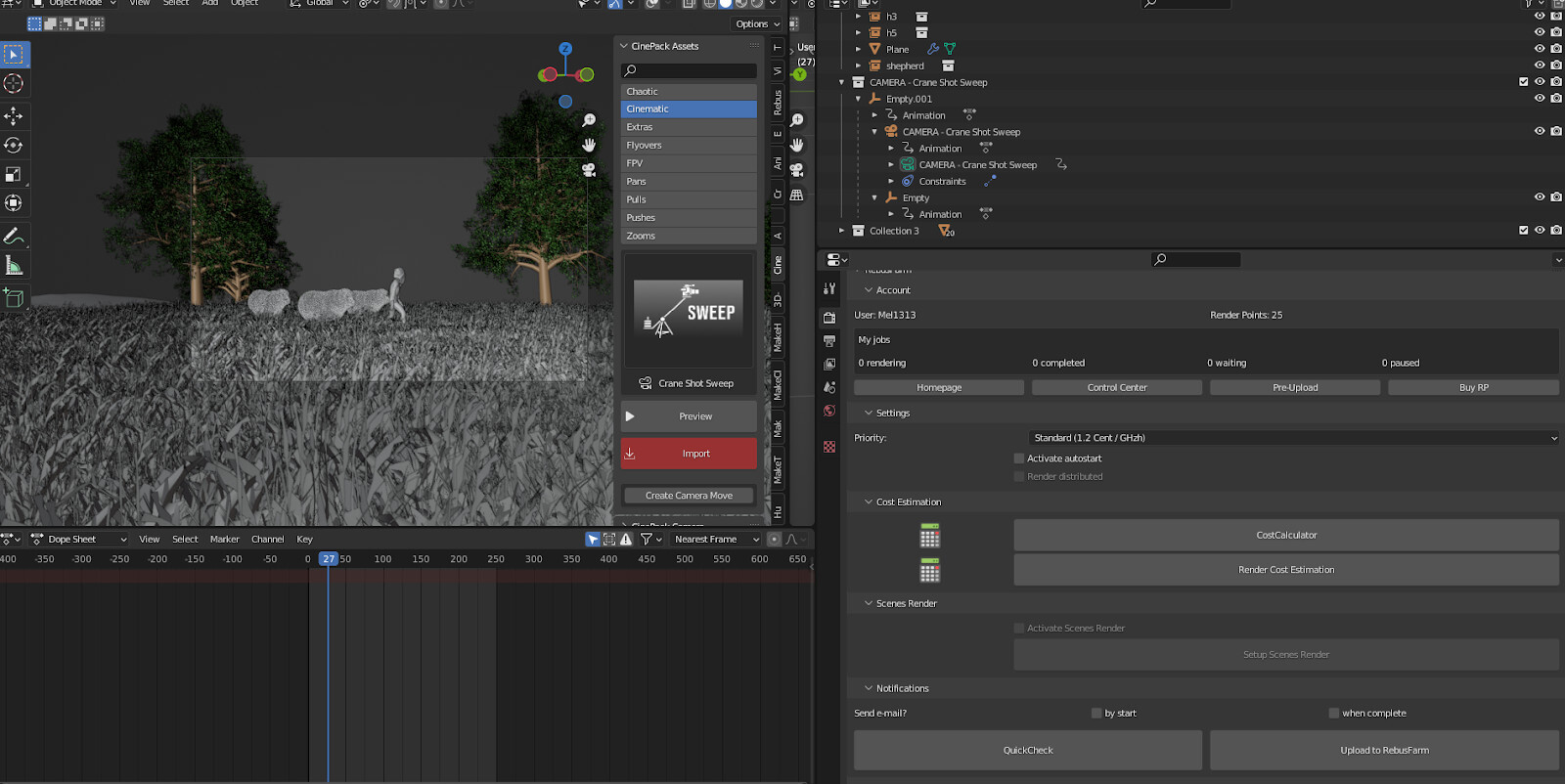
After registering and going through the quickstart guide, downloading and installing Rebusdrop, I found a comprehensive set of controls sitting nicely in Blender’s render settings panel.

Running “quick check” allowed me to identify any problematic areas in the scene before uploading my file - an excellent way to “nip problems in the bud”, as it were.

The logs told me scripted expressions are unsupported, but from what I gathered, the scene should not require any scripts to run. Hitting the fix me button gave me an option to bake all scripted expressions. Other errors will offer other solutions that Rebus Drop will suggest after you hit “fix me”.

Sadly, I couldn’t get Blender to complete the baking process, and it would always crash.

I wanted to indicate a step for my render range, but even after doing so in Blender’s native settings, Rebus Drop sent me prompts asking if I was sure I wanted to render the full 1-250 frame range. I decided to try contacting their support.

After a short conversation with a member of support (who was very friendly and accommodating), it became clear that I would need to make all of my dependencies local to the scene to be able to upload it via rebus drop. This would, unfortunately, take the time I did not have at the moment.

Takeaway:

I love how Rebus Drop integrates into Blender and provides many opportunities to check and resolve problems before uploading any files. However, it was clear that my project workflow wouldn’t fly with Rebus either, and I was beginning to suspect I wouldn’t be able to render projects with this set-up on any online render farm. 

Rebus’ base rates are 1.19 cents per Ghz/hour for CPU and 0.45 cents per OB/hour for GPU, regardless of how many nodes are used. They offer volume discounts up to 60% depending on how many credits you top up:

Renders made with trial credits will come with watermarks, but as soon as you buy render points, you can download your previous renders again with the watermarks removed.  

GarageFarm

With my hopes all but diminished, I resolved to at least finish this little experiment and try my luck with GarageFarm.NET.

When I checked their dedicated Blender page, I was pleasantly surprised by an ongoing 33% off deal they had on all Blender renders. Also, if you register from your software’s dedicated page on their site, you get $50 worth of starting credits instead of the usual $25. 

Their plugin - renderBeamer, is similar to RebusDrop, where it runs as a stand-alone program but also integrates itself into 3D software. However, in Blender, it is way less interactive than RebusDrop, with basically just an option in Blender’s Render drop-down menu to “Beam it up”, which is how one would upload a project.Other than a prompt warning me that the auto-run scripts switch is off on their farm by default, I received no additional warnings for my scene, which could either be a good or bad sign.

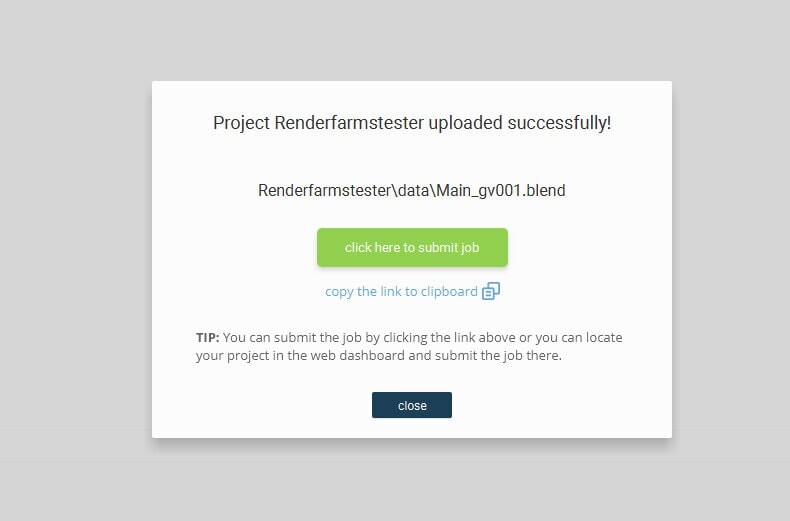
Once the project uploaded I was alerted through a pop-up with a link for me to submit my job. After clicking on it, I was redirected to my web dashboard and another pop-up that allowed me to review some of my render settings before starting the render. The process so far has been pretty straightforward. 

I chose to render on Low priority and, as with the previous tests, add a step of 50 to the frame range.

My 5-frame test was completed successfully, cost me around $2 of credit, and gave me a full range estimate of $100. This felt reasonable to me provided my frames were rendered correctly. When I finally previewed them, I couldn’t believe my eyes.

Tip:  You can preview frames from GarageFarm’s Web Manager by navigating to your renders on the left most panel and double clicking  image files.

All frames were rendered precisely as they should have, with zero additional preparation from my side. I had heard GarageFarm’s support team was one of the best, but I didn’t even need to get in touch with them! I don’t know how, but they took my absolute train wreck of a scene and rendered it without any problems. Since I knew that my scene set-up would work on their farm, I worked on my scene a little more to get a better-looking final render. 

Takeaway:

Other than my not being a fan of the shade of blue they use on their UI, I have nothing but compliments for GarageFarm.NET. While I probably would not have been as disorganized on an actual project, it’s good to know that a farm out there has anticipated situations like mine and developed its automation to handle them. In the end, paying a few extra cents for a worriless rendering experience is entirely acceptable. While it’s always best to stay neat and orderly when managing a project, it’s a boon for anyone nearing the deadline of a job and only then realizing they need a render farm to try one out to great success without needing to change anything in the project. 

Outro

At one point, I was sure this experiment would be a complete bust, and I would have to rethink using linked libraries in Blender and adopt a more cumbersome workflow to be able to use a renderfarm, but in the end, GarageFarm.NET proved me wrong, and I couldn’t be happier. I’d like to emphasize the test project was optimized for my intended production workflow and not for rendering on a network, so I wouldn’t fault Fox or Rebus for not being able to render my project off the bat. I encourage the reader to try out all three render farms since we all have different workflows and would appreciate certain aspects of a render farm experience over others.  Having said that, I was so pleased with GarageFarm that I shared my findings with them, which led to this article!

Thanks for reading, Mel.

------

Originally published at https://garagefarm.net.

Case Study: Surround screen savants - Daruma

Article / 17 October 2022

Designing 3D graphics for normal screens like TVs and laptops and mobile phones is hard enough. Designing them for screens that are twice the size of humans or screens that twist around gallery spaces, or spherical screens is a headache, to say the least. But what may be a headache for many 3D artists is simply all in a day’s work for CG production studio DARUMA.

That’s not to say large screen graphics are all that DARUMA does. They do all sorts of CG output from 2D animation to product showcase visuals to self-folding origami sequences to…it’d be easier to show you:


But it’s DARUMA’s 360-degree screen work that stands out, especially among the wide range of projects that go through our online render farm. It’s not everyday that we encounter artists that not only design stunning visuals but go beyond the visuals to create immersive experiences. 

You see, with visuals that are meant for TV or computers or mobile screens, the perspective of the viewer is fixed – the viewer is always directly in front of the 2-dimensional screen. But what happens when you have a screen that goes above the viewers’ eye level or twists all around them (sometimes even under them!)? DARUMA’s artists don’t just need to make the visuals work on the screen; they also need to consider how the visuals will appear to different viewers in different positions relative to the screen and make the visuals work for all of them.

Here’s another level of complexity: when dealing with visuals for large-scale immersive screens, previews can only tell you so much. You can only really know whether or not the visuals are working 100% once you run them on the actual screens. “There are many things we can't predict and check enough in VR previews. I think the best way is to see and adjust the work on the real site each time,” said DARUMA founder Masako Nishi.

If that sounds complicated, here’s yet another challenge that DARUMA routinely faces when creating immersive theater footage: resolution. Large screens mean ultra-high resolution and ultra-high resolution means long render times. 

Just exactly how high are the resolutions that DARUMA works with? 8K. Rendering 8K visuals on your own machine will probably take…let’s not even bother. DARUMA didn’t. They enlist the services of cloud render farms for every project. 

For their work for the Japan Pavilion at the Dubai Expo, DARUMA went with GarageFarm. “Local rendering wasn't a good option as it was 8K or even larger and it seemed never finished in 24 hours, so rendering locally wasn't our option,” said Masako.

This project was particularly difficult for DARUMA. The concept for the Japan Pavilion was to provide a glimpse of future urban life on Earth. The project required an output of 10,000 pixels of photorealistic forests, underwater scenes, and futuristic cities. “In addition to making a good appearance of water and animals, we were conscious of the composition so that they would not look unnatural and that the eyes of the user could be guided,” said Masako.


Another challenging project was the Eneos showcase that Masako and her team did for the Tokyo Olympics. The brief that the director gave DARUMA was to make viewers feel like they were shrunk down by scientists in a lab and they fly around in little hydrogen-powered spaceships that cruise around the futuristic lab and other scenes. What an idea, right? Nice to think about, hell to pull off. “It was difficult to make it not to be unnatural as much as possible. [But] we succeeded in creating an incredible experience that you really feel shrinking, flying in the sky, and watching sports,” said Masako. 


DARUMA x GarageFarm

With projects of such scale and complexity, rendering becomes even a bigger deal. Not only does rendering affect the final look of the visuals, but rendering speed for huge files can be a deciding factor in whether the project gets delivered on time or not. And for this, DARUMA turns to GarageFarm.

Masako discovered GarageFarm when one of DARUMA’s freelancers recommended it to her so that they could work together on a project. The freelancer previously used GarageFarm for a personal project. While her introduction to GarageFarm may be serendipitous, Masako’s continued use of our online render service is more conscious. 

One thing Masako found good about GarageFarm was the compatibility with the software. In her previous experience with other render farms, Masako encountered numerous software and plug-ins that she couldn’t use. Not with GarageFarm. “I was able to render in an environment with no particular restrictions even for the first time, thanks to the very easy-to-use UI,” said Masako. 

Japan Pavilion at the Dubai Expo 2021

While GarageFarm’s 24/7 support team is often mentioned by many of its clients as a strong point of the render farm, Masako has a unique reason for loving it: the ability to chat in different languages. “To be honest, the reason I chose GarageFarm was there were many languages supported,” Masako said. DARUMA works with many artists from across the globe and having support that can engage their staff in different languages can really help make things go smoothly, especially in situations where there’s an issue that the team is trying to resolve. 

‍“Our staff communicated with the support team. I was surprised that the language for corresponding is a variety and the speed of feedback was very good. It was very helpful,” said Masako.

Another thing that Masako particularly liked about rendering with GarageFarm was pricing and volume discount. “Since we deal with many large-scale works, it is very attractive to have a lot of volume discounts. Even in the case of small work, I think it is a good price range because the unit price will decrease in long-term use,” said Masako. 

Japan Pavilion at the Dubai Expo 2021

As CEO of DARUMA, Masako has to keep a close eye on costs if the business is to be healthy. She has found GarageFarm to be a cost-effective way to render their projects. And when issues were encountered (as it inevitably does when dealing with rendering), Masako loved the workaround from our render farm. “They returned the credit for the rendering time that there was a problem, so it was not wasted. As a result, it was good that all the works were completed within the budget,” said Masako. 

Future for DARUMA

Aside from projects in their current pipeline, Masako is involved in an animation project she’s excited about. All she would tell us about it is that the work will be “incorporating the experience of traveling between real and digital.” That’s intriguing, and after seeing how DARUMA executes larger-than-life projects, this future project is likely to be mind-blowing.

Other areas that Masako is excited about are 3D printing, AI, and NFTs. “I feel that the distance between the users and the creators will be getting closer and closer, and it makes me more excited,” said Masako.

If she’s excited, then so are we.

DARUMA uses 3ds Max, V-ray, and Unity Unreal Engine, among other software.

If you want to learn more about DARUMA studio, you can find them on Instagram @darumajpstudio .

-------

Originally published at https://garagefarm.net.

GPU rendering for Maya: Is it worth it?

Article / 14 October 2022

In the past decade of computer graphics, GPU rendering has become a staple of artists' workflows in almost every 3D pipeline, including Maya users. But, as is the question with most tried-and-true methods, is GPU rendering worth the cost and effort? In this article, we look at GPU rendering for Maya users to see how it compares to other tools and if it's genuinely worth the cost.While this article focuses on the viability of GPU rendering for everyday use on local machines, many of the considerations discussed here also translate to using GPU nodes on third-party cloud render services. If you need an online renderfarm service, or would like to make some comparisons yourself, sign up on our Maya render farm! New users get $50 of render credits to test the service, free of charge and without any need to commit. 

The debate of the decade: GPU vs CPU

So what makes GPU rendering so popular? For starters, speed. GPUs are known for being well-optimized for rendering complex ray-traced environments. While CPUs are well optimized for general use, they aren't especially fast at raytracing compared to GPUs. This means you can get a lot more bang for your buck with a high-end GPU vs a high-end CPU in the same price range if your goal is fast render times.

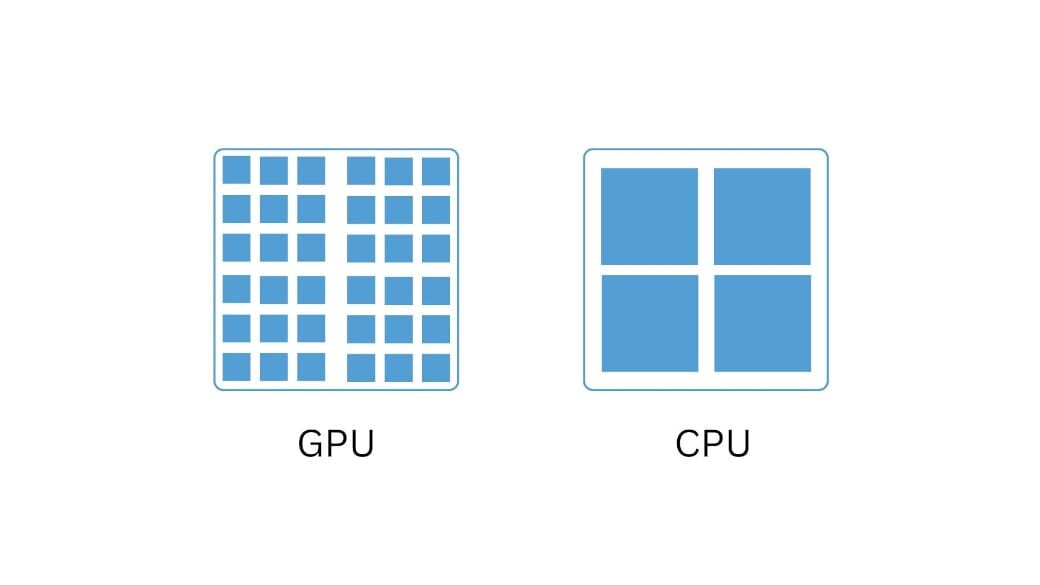
GPUs are designed with many smaller compute units lending themselves to the many small calculations involved in raytracing. CPUs are instead designed with fewer larger cores allowing only a couple of simultaneous tasks.

Additionally, in the past five years, GPU rendering has outpaced the feature development of CPU-based rendering. With a modern GPU, you can take advantage of new tools like the raytracing optimizations Nvidia has brought to RTX Series GPUs. GPU rendering is no longer on the back foot and is now at the forefront of rendering advancements. And with the speed and availability of GPU rendering farms, rendering times can be sufficiently cut to meet tight deadlines.

These days, anything from viewport rendering to tools like X-Gen or Nvidia’s OptiX Denoiser can take advantage of GPU acceleration to make not only your render times quicker but the creation process too. Modern GPU cards from Nvidia and AMD also now support many AI frameworks that are slowly being integrated into Maya for creators, like AI-driven de-noising, texture creation, and physics simulations. These factors make it difficult to ignore the possibility that GPU rendering may permanently replace CPU-driven workflows in Maya.

How much VRAM is enough?

A consideration that has made many 3D artists question the sustainability of GPU rendering is the memory limitations that consumer GPUs bring. Unlike CPU rendering, you can't simply purchase more VRAM when needed since VRAM is built directly into almost all GPU cards. In the past, consumer and prosumer GPUs from Nvidia and AMD were limited to as low as 4-8GB of VRAM (Video Memory). This means that rendering large scenes that require more on-demand memory to render would be out of the question for these GPUs. However, with advances in GPU offerings, this issue has slowly become a lesser one. Modern-day GPUs like the RTX 3090 now come with up to 24GB of VRAM, and server-grade offerings allow almost unlimited VRAM usage by using multiple GPUs to pool VRAM.

VFX like those from Scanline VFX’s work on Stranger Things can require insane amounts of VRAM. 9

If you're in the market for a GPU for rendering in Maya, the amount of VRAM a GPU has should be a priority if you regularly render complex scenes with many large texture maps. The 12-24GB available on high-end consumer GPUs are almost always enough to work with if you're working with less heavy textures or smaller scenes. However, high-end VFX or studio-grade shots could require huge amounts of VRAM, often up in the 32-64GB range. GPUs with these capabilities are almost always available exclusively on server-grade GPUs. Because of this, GPU-accelerated renderfarm services are far more cost-effective than building your own render server, as these cards can easily creep into the quadrupedal digit range.

Fast and faster

Apart from auxiliary questions, the top consideration for 3D artists when picking a GPU is almost always speed. So how do GPUs compare to CPUs? Well, the comparison can be hard to quantify. However, benchmarks comparing standalone CPU rendering vs standalone GPU rendering can give a rough estimate. According to tests done by Pudget Systems in V-ray comparing Nvidia Titan GPUs to AMD Threadripper CPUs, best-in-class GPUs can beat best-in-class CPUs by reducing render times by about 20-40% conservatively. Combine this with the new features the modern GPUs offer, and it's difficult to see CPU-only rendering staying around for long in the professional space.

The same can be said for many render farm offerings. Although CPU rendering is still a popular choice for render farms, GPU accelerated farms can offer much quicker speeds than traditional farms. As we’ve shown in the past here at GarageFarm, GPU render nodes can bring a single render frame down from 6:29 to a mere 1:20. On a large-scale animation, this can multiply into being quicker by hours or even days for heavy scenes.

Convinced? Now what?

So, you're convinced. GPU rendering is the future. But now what? There are dozens of GPUs on the market to choose from, each with a unique feature set and limitations. With new players like Intel entering the GPU market and supply chain issues causing shortages, it's never been harder to pick the right GPU.

If you regularly render large or complex scenes, a GPU render farm is the best option. Oftentimes, enterprise-grade GPUs are the only GPUs that can support the requirements for these types of scenes without relying on slower CPU-based rendering. For artists, a renderfarm can provide the tools to render enormous scenes at a far more reasonable price than purchasing a high-end Nvidia Quadro card or AMD PRO series card. If you decide to rely on cloud rendering, you likely still need GPU for test renders and the creation process, but the GPU won't need to support the heavy workload and memory needs of final renders and animations.

Nvidia’s recently announced RTX 3090 includes 24 GB of VRAM and can handle more complex scenes than almost any previous consumer GPU.

Even for less demanding projects, the speed of a render farm can be essential to meet deadlines. Though GPUs are extremely fast at what they do, even the best GPU can’t compete with the resources of a full-fledged render farm when it comes to speed.

In the mid-range, Nvidia's A-series cards offer up to 48 GB of VRAM and very speedy performance that is almost unmatched in the GPU market. These cards are expensive but offer the best performance apart from server-grade cards.

If you mainly work on abstract scenes or smaller projects requiring less than 24GB of VRAM, then the latest Nvidia 4000 series or AMD RX 6000 series are a fantastic choice. Nvidia is currently at the cutting edge of GPU development with cards that offer support for AI Creation tools and accelerated raytracing. On the other hand, AMD cards use the RDNA 2 architecture to offer hardware accelerated raytracing and a host of other optimizations. However, it's worth being cautious of AMD cards depending on what render engines you use day-to-day. 

Many render engines lack support for GPU rendering with AMD-branded cards. For example, V-ray and Arnold for Maya lack support for AMD cards altogether and instead require Nvidia's CUDA technology. Redshift render for Maya does support some AMD GPUs on macOS but lacks support on Windows or Linux. In the end, it's essential to check the requirements of your chosen render engine to be sure that the GPU you choose is supported. If you often switch or change up your workflow, an Nvidia GPU may be best, as almost all modern render engines support RTX and A-series cards.

Conclusion

As modern-day 3D graphics become increasingly commonplace, technology will only become harder to predicate when it comes to rendering. This is why buying a mid-range GPU for day-to-day work and utilizing a render farm for larger projects is a solid choice. With a cheaper GPU, you may run into bottlenecks during the lookdev and creation process. But with a top-of-the-line card, you run the risk of investing heavily into a technology that may change in only a few months or years. At the end of the day, it’s up to your specific needs and Maya workflows to know the exact GPU for you, but I hope this article has given you the tools you need to make the most out of GPU rendering for Maya.

---

Originally published at https://garagefarm.net.

AI: Is art doomed?

Article / 23 September 2022

The CG Artpocalypse is here (or so some say). AI platforms like Stable Diffusion, Midjourney and Dall E -2 have lately been making waves on the internet. While artists of all strokes have been commenting on tech’s looming threat to their careers for some time, the level of sophistication of AI today has made even the hardiest sceptics begin to wonder: Is this the end for CG Art?

Before we continue, if you’re a 3D artist who needs to render something quickly, check out our online render farm! We give up to $50 of render credits to new users so you can try our service without any need to commit. Our team of specialists is available 24/7 to answer any questions you might have.


What history tells us

The invention of Photography in the 19th century aroused the same concern among artists of that time. Art critics dismissed it as an empty automated process devoid of any meaningful thought behind its production of images. That didn’t stop Photography from being regarded as fine art today, with many valid points that justify the change in sentiment.

 In this age, anyone with a mobile phone can take a photograph, but that hasn’t put actual photographers out of work. Artists use photos as a dependable reference and essential components of the final piece in some digital art practices. Art now embraces Photography wholeheartedly.

That doesn’t mean that traditional artists hadn’t lost avenues of income, though. Photographs replaced hand-drawn illustrations that once populated newspapers, manuals, movie posters and the like as soon as the technology had developed enough. The demand for someone with the ability to draw and paint had narrowed itself to niche industries. 

The arrival of the Digital Age hasn’t helped either. Even in Concept Art for video games today, artists use photo manipulation to produce work faster. In some markets, Photographers likewise have lost work to 3D rendering. The speed and cost-effectiveness of visualising products inside a 3D program have sometimes invalidated the need to hire photographers to create images for catalogues or brochures.

Despite all this, Art has prevailed, and new opportunities for the working artist have arisen. Regardless of their device, today’s image maker gains recognition for skills that have taken practice, sacrifice, and mindfulness that can only be the product of years of experience. Look at the thriving Painters, Illustrators, and 3D artists on your favourite social media platforms. Artists and critics have since used the advent of Photography as an analogy to prove that Art is and always will be here to stay. But what happens when Art and the craft of making art meet a device that can draw from a library of outstanding works from antiquity to the modern day and create stunning images from a few lines of text?


A glimpse of what’s to come

Midjourney is an example of AI’s future in Art and Design. We log into their Discord server and type a description of what we want to see in a thread. We get four results within minutes and options to improve upon any of those results. Users have speculated on what prompts make a difference. Some findings suggest that Midjourney responds best to specific key phrases and not necessarily any arbitrary description at its current stage.

Even so,  in their nascent stages, the new generation of AI image generators is already capable of replicating a considerable part of the human artistic process- drawing upon a visual library and mixing elements to create a compelling picture. Suppose we base its evolution on the current trajectory. In that case, it’s safe to assume that it will only get better at parsing prompts until paint-overs or editing by hand will no longer be necessary. Perhaps at some point, we’ll be able to generate entire 3D scenes with a few sentences as well. 


Weathering the Artpocalypse

What does this mean for artists and designers who spend their lives mastering the tools of our trade? Will our work hold sway against someone with a knack for giving fitting instructions to an AI generator? Will our craft be reduced to novelty- capitalising on the feat of making things by hand? Will the Twitter posts of tomorrow be jaw-dropping AI-generated renderings of everyone’s flights of fancy?

A cynical answer would be that we would value the ability to create images much less than we do today, which is probably much less than we did a century ago. The less time and skill required to produce Art, the less scarce it becomes, and scarcity drives value. 

An optimistic answer would be that the human spirit will always shine through hand-made work, whether a painting, photo or 3D render, and people will always be able to make the distinction.

A pragmatic answer would be that the model we use to evaluate Art today will change. We might appraise paintings not only by the final result but also by their technique, showcased in a timelapse of their process. We might begin to recognise the Art in the execution of strokes or mark-making and how each painting stage is itself Art. We might place in higher regard high-concept work, where there’s clear evidence of a narrative, question or statement expressed beyond “female portrait with ornate floral adornments” or something that directly translates to a prompt for AI. One can only speculate how exactly the model will change, but maybe a more nuanced baseline of scrutiny will keep Art and the human practice of Art alive and even elevate it.

Almost all the images in this article are from either Midjourney or Dream Studio. As a quick exercise, I generated this image using the prompt:  “the AI art apocalypse”.

The result acted as the seed for this 3D render. 

Would I have been able to get an image like this by adjusting my prompt? At some point, maybe. But it was still more gratifying to develop it by hand, and I now have a scene I can improve upon and even make a short animation out of in the future. The paintings in the scene are more AI-generated images from Dream Studio.

In the end, none can say what this means for Art as a practice or livelihood. However, we must embrace change and grow like those before us, hopefully like those after us. Is this the end for CG Art? Only we decide.

---

Originally published at https://garagefarm.net.

How Garnamatac is creating a community of visual artists in Georgia

Article / 19 September 2022

Becoming part of the "industry" can be one of the most challenging parts of becoming a 3D artist. From imposter syndrome to a simple lack of opportunities, artists are always looking for a way in the door. However, the people at Garnamatac have built a studio that works to solve this problem by producing not only high-quality animation content but also opportunities for the greater 3D community to get started in the industry.

Meet the GARNAMATAKIANS

Founded in 2018, Garnamatac is a boutique animation studio based out of Tbilisi, Georgia. The studio has worked with a wide range of clients from large ones like Nickelodeon, to local clients such as Georgia's Innovation and Technology Agency. 

What makes Garnamatac unique as a studio is their dedication to social consciousness and to pushing forward the local animation industry. The four founders of the studio told us that they've been working from the beginning of their partnership to align their vision and maintain a commitment to long-term values and quality over possible short-term gains. The results speak for themselves. Garnamatac has built an impressively strong presence and community around their work.

"Committed to some predetermined values, we unanimously decided to exclude ourselves from engaging in projects related to a selection of detrimental business sectors like Gambling, alcohol, tobacco, meat-related products, military, and politics. In contrast, we always try to accommodate social projects by regulating our fees, efforts, and availability accordingly."

“Can’t Stop Smiling” music video (Nickelodeon) by Garnamatac 

In an industry landscape heavily focused on corporate clients and commercials, Garnamatac's approach is a refreshing reminder that anyone can make a difference in their industry.

Supporting artists with Training-for-Life

On top of providing animation services, Garnamatac is working to develop the animation industry in Georgia by providing an example of what a top-quality studio there can provide for not only clients but to artists looking for work.

“Can’t Stop Smiling” music video (Nickelodeon) by Garnamatac

‍"We make sure all GARNAMATAKIANS enjoy what they do and engage in projects that are meaningful one way or another. Our studio has a very humble beginning and we want to stay true to the roots, but at the same time we hope to bring significant value to the emerging animation industry of Georgia"

Aligned with these values, Garnamatac initiated a new education program called Training-for-Life in partnership with the USAID Economic Security Program that seeks to develop the talents of emerging visual artists. This provides a service to local artists, but also a lucrative and steady recruiting scheme for the growing studio.

Workflow

When it comes to workflow, Blender is Garnamatac's tool of choice for animation alongside Maya and Blackmagic's Fusion. Blender, an open-source tool, served as a perfect choice for a studio inclined towards community engagement and social values.

"The variety of tools, openness, unity, and engagement of the community in overcoming challenges [made Blender an attractive choice]. Its lookdev, shading, rendering tools gave us an edge to utilize interactive feedback. Also, while some parts are not as rigidly developed as others, Blender's developers make sure the software's ease of use is maintained. We as artists can really appreciate that."

Recently Garnamatac has been working on projects for Nickelodeon such as the “The Can’t Stop Smiling “ music video. The project was produced by Cartuna, who were also in charge of pre-production and creative direction for the music video. Garnamatac was in charge of the rest of the 3D and animation pipelines.

The team is now working on launching pre-production for their own short film project. Garnamatac places a high value on the impact that producing their own project can bring. While commercial work pays the bills, internal projects, and initiatives fuel creativity and community, two essential components of a strong industry.

“Can’t Stop Smiling” music video (Nickelodeon) by Garnamatac

‍"Throughout the past couple of years, we have achieved adequate sustainability to pursue personal endeavors and initiatives. On top of that, we’re slowly switching our focus to building the community through education and supporting other local studios in attaining control over their creative efforts."

Working with GarageFarm

Garnamatac uses our online render farm for many of their larger-scale projects and rendering needs. So far, they’ve rendered over 50,000 animation frames using both our Blender and Maya render farm. Their recent work on “Can’t Stop Smiling” involved 4,000 frames alone. Support was a big factor for them along with being able to accurately estimate render needs in their production schedule. In the past, the team had some painful experiences that led them to be at first skeptical of jumping into online rendering again.

“Can’t Stop Smiling” music video (Nickelodeon) by Garnamatac

‍“At first, a welcome bonus did the trick - we could do risk-free tests prior to migrating entire projects. We also made sure the customer service was there and knowledgeable people were available for support 24/7. The whole adoption process has been surprisingly smooth. So, basically, we were lured by a bonus and affordable pricing but kept coming back for convenience and peace of mind. We’ve had some painful experiences with farms in the past and were pretty biased. Now it’s part of our traditional workflow… One of the most important improvements we’ve made to our workflow since our inception is the inclusion of GarageFarm. Our production times decreased without quality sacrifices, which is a dream come true for every studio everywhere, and our confidence in tackling massive projects increased substantially.”

‍


What first prompted the studio to use a render farm was their need to accommodate an unorthodox pipeline for a project. A render farm allowed them to take on the project and work with an unusual pipeline without affecting the final project in a negative way.

“The rendering phase involves the most uncertainty when we are discussing a production schedule. The larger the project, the larger the miscalculation which led to late delivery most of the time. Being late is not a great trait to be associated with…The Can’t Stop Smiling music video was produced in 3 months, this includes pre-production (concepts, storyboards), production, rendering on GarageFarm, and post-production (compositing, grading). Had we not had the farm on our side, we would need 50% of the entire production schedule to render the project on our machines.”

“Can’t Stop Smiling” music video (Nickelodeon) by Garnamatac

Moving forward in an evolving industry

Garnamatac’s innovative community approach to studio management and GarageFarm’s ability to enable them to take on large projects has helped the studio move forward. However, they aren't stopping there. The studio is looking at using new tools like Houdini alongside Autodesk Maya and Blender to push the limits of their productions. Houdini offers a wide variety of procedural and simulation tools that simply aren't available on other packages. Clarisse is also being considered at the studio for use in the look development process to speed up their workflow.  

“We’re also considering the use of Clarisse because it should considerably accelerate our lookdev process due to how effortlessly it copes with massive datasets.”

And of course, AI is primed to play a role in the studio’s future. The team is looking forward to using next-generation simulation tools that AI is pushing into new territory. 

“It’s apparent that AI will change the way we look at simulations. With the help of AI there has been a giant leap forward towards being able to generate better approximations of physically based simulations. It is not too far in the future that we will see real-time simulations of physics without any approximations, and this will result in true photo-real simulations.”

Garnamatac is pushing a unique perspective in the studio scene by being nimble and responsive to the industry’s trends and needs. While many growing studios tend to develop a corporate atmosphere, Garmanatac’s work with the Training-for-Life program keeps their team grounded in the needs of the animation community. Their commitment to social causes is truly enviable. And their portfolio of clients and projects is equally so. 

To see more of Garnamatac's work and their full showcase, visit their Behance. Or you can stay up to date with the studio's goings-ons on Facebook and Instagram @garnamatac

---

Originally published at https://garagefarm.net.

Lights, surfaces, & rendering with Simon Howells

Article / 12 September 2022

The architectural visualisation industry is always on the move. Firms and artists are always looking for the next step in realism and new ways to impress clients. But Simon Howells has taken a different approach to archviz. Instead of looking to the newest tools and trends, Simon focuses on quality to create some pretty incredible renderings for his collaborators.

 However, a focus on quality doesn't always come easy when render times grow exponentially as clients request changes and variations on projects. So today, we hear from Simon about his approach to visualisation and how he uses our render farm to meet deadlines and overcome the difficulties of rendering large projects.

Simon is a freelance artist producing architecture and product visualisations based out of Sydney, Australia, where he lives with his wife Karen and their dog Roscoe. Simon started out his career as a furniture maker living in London. His entry into visualisation was born out of a desire to visualise his own designs but soon grew into a career itself after graduation from the University of Hertfordshire in 2009 with a Master of Arts degree in 3D Digital Animation.

"[After college] I started working for Random42, a medical animation company in London, where I stayed for five years. Since then, I have been in ArchViz. My main service is Architectural Visualisation with a cross-over into interior design-based product visualisation."

In December of 2019, Simon went fully independent only to be hit with COVID lockdown and cancelled projects a couple of months into freelancing. He described the experience as extremely difficult yet confidence-filling.

"...the work I had lined up immediately evaporated the moment the COVID lockdowns hit, which left my wife and I struggling to make ends meet. But with her ability to feed us both on $AUD40 per week and with a couple of loyal clients managing to stay afloat, we survived. Although it was extremely difficult, having made it through something like that fills me with confidence that being the captain of my own ship is definitely worth the sacrifice of a secure salary."

GarageFarm for complex surfaces

Simon usually relies on his own system to render his work but turns to GarageFarm’s cloud render service when deadlines or project requirements demand a more robust rendering solution. 

“Typically, I have enough render power to meet my needs. Being a solo artist, I can usually work during the day and render during the night, but when I have jobs that have multiple variations or the client needs a tight turnaround, I render on the farm, which is invaluable. The first time I used GarageFarm was on a job involving a large number of colour variations. 

Image credit: Cameron Design House https://camerondesignhouse.com/

Before using GarageFarm, Simon had used other online rendering services to fill the gaps but was never satisfied with the support or rendering experience other farms had to offer. For freelance artists like Simon, a smooth rendering experience with top-notch support is important so that they can turn around and provide top-notch, timely work for their clients.

“The technical support is [GarageFarm’s] stand-out component. I’ve been doing 3D work for long enough that I know my way around a scene, so when there is a problem, it’s usually either an obvious lack of attention on my part or a technical problem at the other end. On the few occasions where I have had a problem, the support staff have been very quick and knowledgeable, either pointing out my glaring mistake or finding and fixing the technical issue.”

“I was originally using Rebus farm which was fine…but no more than that. Then there was a problem with my scenes not initiating on their farm when they had previously been rendering fine. I went back and forth with the support staff for days, always with their assumption being that the problem was at my end until, eventually, they went quiet without the problem being resolved. Needing the job finished, I searched for alternatives, and GarageFarm was the first one I tried, and I haven’t looked back.

Simon Howells X Cameron Design House

Simon’s latest project for Cameron Design House demonstrates how render farms like GarageFarm play a key role in the workflow for artists like Simon. He was tasked with creating visualisations and product renderings of the firm’s latest sculptured light piece. This meant that he needed a way to quickly produce not only one set of deliverables but many variations and three animations that demonstrated the range of colours the product was available.

“The client's brief was to show their full range of colours available in a consistent and photo-real series of images, both in on and off states, for use in marketing and on their website.”

In the end, there were 312 animation frames that, according to Simon, would have taken roughly 580 hours to render locally. On GarageFarm’s servers, the task took fourteen.

Image credit: Cameron Design House https://camerondesignhouse.com/

Simon used 3ds Max, and Corona renderer for the project. The need for photorealism and the complex interplay of the hand-blown glass and light refractions of the light sculpture meant that Simon had to plan to use a cloud render service from the beginning.

“…the combination of blurry refractions and subsurface scattering meant the render times were pretty high and not ideal for multiple variations and animations. The use of a farm was always an inevitability; even then, I had to make trade-offs between render time and render noise to keep the job within budget.”

Refractive surfaces are known to be one of the most challenging kinds of surfaces to render for their tendency to generate lots of noise. For projects with these kinds of surfaces, render farms are often the only realistic option for rendering the final project.

Archviz, furniture, and the future

Simon isn’t one to jump at the first new trend in the archviz industry, but like many of us, the constant improvement in interactive rendering tools has allowed him to visualise work quickly. Tools like Corona and V-ray are now integral to his workflow. 

Image credit: Cameron Design House https://camerondesignhouse.com/

“I’m not normally one for keeping an eye out for the next big thing, but what has helped my workflow a huge amount is a rapid improvement in the last few years of interactive rendering in Corona and VR.”

Simon is currently working on a number of large architectural projects in the Sydney area and is hoping to continue his work while also developing more time for his other passion, furniture making.

Be sure to follow Simon on Instagram @simonphowells and visit his website simonphowells.com to see more of his work.

If you’re looking for a way to speed up your own project timelines, signup here to receive $25 of free render credits towards your first cloud rendering project.

----

Originally published at https://garagefarm.net.

From archviz to kid’s shows: The wonderful and unlikely 3D journey of the brothers Defaye

Article / 05 September 2022

OKIstudio founders Olivier and Christophe Defaye talk to us about how they went from visualizing Olympic stadiums to creating animated series for children

‍Everyday, our cloud rendering servers at our online render farm run projects from archviz firms, animators, 3D art creators, character designers, virtual and augmented reality developers and film productions. But it’s not everyday that projects from those different disciplines come from a single studio.

AOKIstudio is different.

AOKIstudio is founded by Olivier and Christophe Defaye, two brothers from France who studied architecture and got their start in 3D by creating renders for their own architectural designs. But how do trained architects go from creating this:

Olympic stadium. 3D image by Olivier Defaye, AOKIstudio

To this:


‍The short answer…well, there’s no short answer. Their story is a journey that spans over 7,000 miles, 3 cities in 2 continents, with many twists and turns. 

So we already know that the Defaye brothers started as an archviz firm in Bordeaux. When they moved their studio to Paris in 2000, this was where the first twist in their story occurred. One way or another, while doing archviz work for various clients, they ended up doing some projects in the luxury sector. Their first project was for the brand Lancome, quite a leap from their architectural clients. 

Doing work for Lancome and other clients in the luxury sector led to them being involved in animation work for a children’s program for TF1, a French TV channel. Olivier didn’t elaborate on how they made the leap from the luxury sector to doing a show for public broadcast but one thing was for sure: this was the point of no return. Possibilities opened up for the Defaye brothers and there was no looking back. This is their first animation for TF1:


All this happened within the span of just a year. After they had just made a leap in terms of the work they do, they decided to make another one. In 2001, Olivier and Christophe decided to open a studio in Tokyo. Remember, just a little over a year ago, these two artists had been solely doing architectural renders. Now they were doing character designs, animation, even some writing. Just as they were getting a handle on these new skills, they then decided to fly over 6,000 miles and open a new studio in a city where they don’t speak the language.

The Defaye brothers are different.

In Tokyo they named their studio AOKI, meaning blue tree in Japanese. And like a tree, the nature of their projects branched out into various directions. This was where they encountered some of their most challenging projects. 

This one here, a commercial for a bottled water brand from over 10 years ago, gave them headaches with rendering. The project involved hundreds of transparent bottles of water and this meant caustics. Caustics are light that passes through a diffusing surface and usually spell hell for 3D artists come rendering time (if you want to understand better what rendering is, you can read our article about how render farms work). But Olivier and Christophe were not ones to back down from a challenge and so they solved it and came up with this delightful commercial:


Here was another challenge for the budding AOKIstudio: a giant dragon ship flying across the sky. Unlike the bottled water commercial, the problem wasn’t complicated lighting algorithms. For this one, it was the ship’s sheer size. It simply took a long time to render:


Speaking of long render times, this was the main reason that AOKIstudio enlisted the help of an online render service. Some time ago, AOKIstudio was tapped by NHK, Japan’s main public broadcasting channel, to create a full CG animated historical movie in 4K. It sounds like an exciting project, but the ultra-high resolution combined with the high standard of excellence that the Japanese demand in anything sounds more like a nightmare for the 3D artists.

NHK historical drama “Sanada Maru”

“It was really interesting to work with historians to recreate Osaka castle with the environment,” said Olivier. “[But] 4K rendering can’t be done in our company.”

The Defayes discovered our render farm quite randomly, actually. “I entered a link from the Corona render Website out of curiosity,” said Olivier. “I chatted with a member of your team, I could feel the British humor in that chat, and I really appreciated the contact.” 

This is yet another win  for GarageFarm’s 24/7 support team. “Your chat team is great, really reactive, really kind. I can’t wait to put my next project on the farm,” said Olivier.

Our support team may have gotten Oliver and Christophe to start using our online rendering services but it was our rendering speeds that got them to stay. In commercial projects, like this one they did for the video game Pokemon GO, Olivier said that having access to fast rendering speed is important due to the nature of getting approvals from clients.

“What's complicated in advertising is that clients need to be able to intervene on the project as late as possible,” said Olivier. “In this sense, the use of the farm becomes indispensable.”


In 2007, Olivier and Christophe decided to close their Paris studio and open a new one in Shanghai. They still have their home in Paris and so they do a lot of online collaboration when working, using platforms like Dropbox, Skype, and GarageFarm to get things done. So when the pandemic happened, working remotely wasn’t new to AOKIstudio.

Yet another proof of how different the Defaye brothers are, always a step ahead of the pack.

What’s next for AOKIstudio? Based on their history, it is not easy to tell. They could suddenly create NFT art just as easily as they could decide to develop their own video game franchise. But right now, aside from the commercial and film projects currently in the studio’s pipeline, Olivier is focusing on children’s films. He believes that there’s a lot that can be done for children so much so that he started a blog about it. If you, like us, are intrigued by what they’ll do next, keep an eye on their website and their Facebook page.

AOKIstudio uses V-Ray, Corona, Octane, Unity, iToo’s RailClone and Forest Pack, and Houdini.

----

Originally published at https://garagefarm.net.

How Pat Giles uses 3ds Max & GarageFarm for architectural illustrations

Article / 25 August 2022

Gbangs Theory

Gbangs Architectural Illustrations co-founder Pat “Gbangs” Giles maximizes the integration of 3ds Max and GarageFarm.NET  to create amazing architectural 3D images

Gbangs Giles’ images make me smile. There’s something about the light that makes me feel...soft-hearted. While there’s nothing overtly emotional in his images (they are mostly interiors and exteriors of architectural renders often without any people in the scene), his images somehow convey the sense of having a good day. No, it’s the sense of having the perfect day.

Exhibit A: 

35 The Avenue Nedlands, Western Australia - Nicheliving

Exhibit B: 

Victoria House Shenton Park, Western Australia- Hesperia

Gbangs’ renders are so photorealistic but the photorealism alone does not account for the feeling that the images convey. The designs, of course, are stunning in themselves but even the best designs can appear cold and lifeless. Pat has a trademark-able light that humanizes empty rooms, softens industrial facades, and naturalizes futuristic forms.

Exhibit C:

Western Australia - Fabric Property 


Gbangs x GarageFarm

How does Pat do it? Well, there’s no explaining the Gbangs magic but we can gain some insight into the method, with our own render farm having some part in it.

The main reason that Gbangs works with GarageFarm is integration. “I really like the way the app seamlessly integrates with 3ds Max. I love the way it tells me in advance if I have incorrect settings. I also find the newsletter really informative,” said Pat. 

This seamlessness between 3ds Max and GarageFarm gives Gbangs a  level of creative freedom that he wouldn’t have if he didn’t use an online render farm. “Being able to send the rendering duties away to GarageFarm is a lifesaver. As part of our more boutique service, I am personally touching every image that we create. It would not be possible for me to do that if my workstation is rendering,” said Gbangs.

Patrick has learned to value this freedom because of his contrasting experience back when he was still a visualizer for another studio. “At my previous studio we had our own in-house render farm, and it's really not worth doing it yourself. Quite frankly I found having an inhouse render farm painful to set up and difficult to maintain, and I wasn't even the one doing it,” said Patrick.

Outsourcing the rendering process to a cloud render farm, as Gbangs learned, leads not only to saving time on current projects but also to gaining time to do others. “It's been a real game-changer. It means that we can easily contribute to much larger projects.  It also means that we can afford to experiment a little more with animation and new technologies.”

This freedom also isn’t just creative; it’s also practical. Pat recalls an instance where mistakes in the settings could have cost him a lot both in money spent and time lost had they not been caught by GarageFarm’s support team. “I had made some catastrophic incorrect adjustments within the render engine that were going to cause an absurdly long rendering time. Thankfully a professional and knowledgeable person from GarageFarm paused the render and reached out immediately to explain the issue. They guided me through exactly what the problem was and how it could be rectified.” 

Gbangs and the past

Circling back to Gbangs’ deft touch, particularly with light, perhaps his personal history partly accounts for it. He grew up and started his career in Australia, where sunlight suffuses the wide sprawling expanses of reds and browns in places like Uluru. But these days, his home is more than 16,000 km away in Central Portugal, where he lives with his partner Filipa and their son Tiago. Here, sunlight dances with the aquamarines of the sea and the soft pastel hues of the brick-roofed structures along the coast. 

His 25 years of experience with architectural 3D must have something to do with his magic as well, along with his unique history of collaborating in highly emotive fields of creativity like music, film, and theater. 

Patrick got his start with 3D studying at Architectural Technology at Los Angeles Trade Tech. He then moved back to Australia to work at MJA Studio joining childhood friend and multi-award-winning Architect James Thompson, who gave him direction when it came to the nuances of architectural design. It was also James who dubbed Giles “Gbangs.” After 4 productive years at MJA, Giles co-founded Gbangs Architectural Illustrations.

Gbangs and the future

Gbangs sees how it’s such an exciting time for 3D art. NFTs and the metaverse have legitimized 3D art and it’s only becoming more and more mainstream. Twenty years ago, 3D art was so niched that only a handful of people were legitimate sources of knowledge if you wanted to learn to do it. Information was limited. But now, Gbangs sees being a 3D artist as something as mainstream and financially rewarding as being an accountant, a lawyer, a doctor, etc. In other words, 3D artists are starving artists no more.

In the near future, Pat will continue his archviz work, delivering high-quality still and moving images for new and returning clients. In the time that he saves by rendering with GarageFarm’s cloud render services, Gbangs toys around with ideas for non-commissioned work, like interpreting scenes from nature and from pop culture via the ancient art of moledro. The Beatles’ iconic crossing of Abbey Road portrayed as four stones stacked together? Yes, please.

To view more of Gbangs’ work, check out his website, Facebook, and Instagram.

---

Originally published at https://garagefarm.net.