Website powered by

Rendering hyper-real environments with Studio Aiko

Article / 22 August 2022

Hyper-realism is often proposed as the holy grail of computer graphics, one of the most challenging and complex types of art to create because of the time, budget, and resources realism requires. Studio Aiko confronts these challenges head-on to make some of the most compelling environments in the industry. In this article, we hear from Meny Hilsenrad, co-founder of Aiko, about the process of creating and rendering realistic environments for real-world clients.

Meny started Studio Aiko in 2005 with his business partner and fellow artist Yair Alony after first being a hobbyist and then working professionally in the animation industry.

‍"I started with CG as a hobby when I was 15 years old back in 1992. I worked with Autodesk 3D Studio 2.0 for DOS for fun without any plans initially to work professionally in the animation field. When I was 21, I had my first opportunity to work in an animation studio working on broadcast projects. I gained a lot of my first experiences in things related to CG there.”
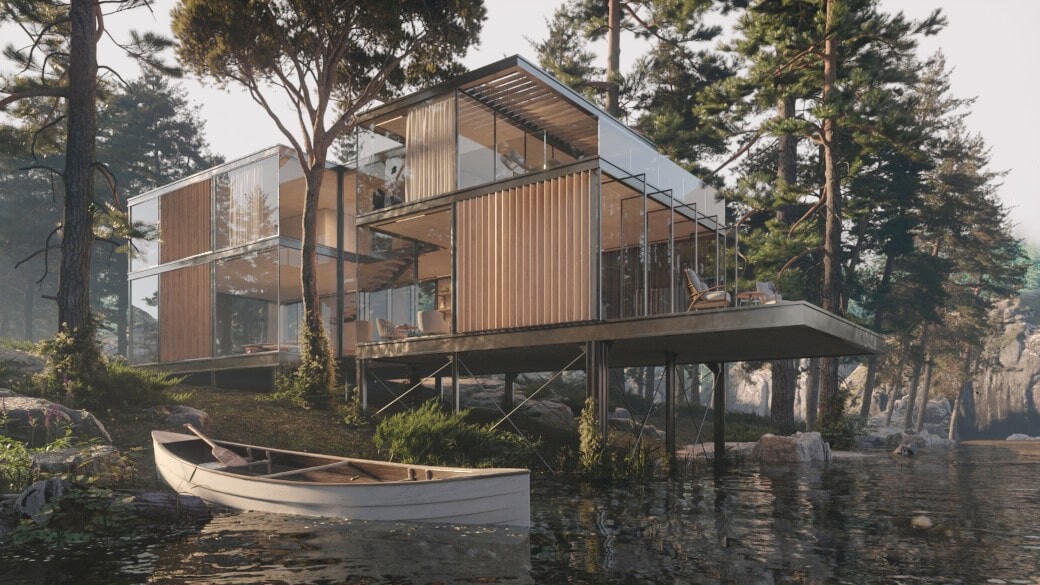
River House by Studio Aiko

‍“In 2005 together with Yair Alony, who was my colleague in an animation studio, we decided to open our own animation studio. We called in Studio Aiko, and we have been working together for over 17 years and hopefully for many more years to come!"

Studio Aiko specializes in hyper-realistic CG for archviz, commercials, and product rendering. Their portfolio includes work for clients like Adidas, Huawei, and Kodak, alongside dozens of architectural firms.

Desert Oasis by Studio Aiko

Small team, big projects

Despite their small team, Studio Aiko regularly works on projects with demanding render needs and deadlines. The current project they're working on is no exception.

"We are currently working on several interesting projects. One of them is an in-house project which will be finished in the next couple of months. It's an architectural animation project, and the shots there are quite complex to render. I believe that at some point, we will use your service in order to speed up the rendering and make it ready sooner."

Desert Oasis by Studio Aiko

Studio Aiko uses our online render farm for rendering their larger projects to speed up project delivery and simplify their project pipelines. The team uses our renderBeamer plug-in to integrate rendering into their workflows tightly. The plug-in helps to keep things simple by handling project uploads and frame downloads automatically. Meny told us that these advantages help to produce the bottlenecks that rendering can create when they're managing multiple projects at the same time. In fact, it has allowed the studio to take on even more work.

The Tunnel by Studio Aiko

‍“The simplicity of the plug-in makes sending the project for online rendering feel like we are using our own local render farm. You can hardly feel the process of uploading and setting up the scene for external rendering, and when the project is done rendering, it's automatically downloaded to our server.”

‍“The ability to send and receive renders 10x faster than we would if we rendered them locally gives us the ability to meet deadlines and to work through several projects in our pipeline at the same time. Today we know that we can take on several projects at the same time, some of them might be on a tight schedule, and we can still handle them thanks to the possibilities we get with GarageFarm.NET.”

The Tunnel by Studio Aiko

GarageFarm for realism on a budget

Meny also told us a few things about why he picked GarageFarm’s render farm services. GarageFarm adds minimal overhead to post-production and, according to Meny, almost never has errors. And when there are hiccups, support is always ready.

‍“After years of experience in other rendering services, we found that yours is the most simple and easy to operate. The process of sending a project to your render farm involves almost no errors, and in rare cases when it does happen, we always get a quick response and help throughout the problem.”

‍“There were some issues in the beginning while studying the workflow of the renderBeamer plug-in. But most of those issues were simple, and your online tutorials helped us solve them quickly. There were 2-3 complex issues I stumbled upon which I couldn't figure out on my own, so I used your real-time chat support, and they helped me solve the problem.”

Studio Aiko’s pipeline

A typical project for the studio involves six to eight HD or 4k shots and some high-resolution stills. Most renders are for use in architectural visualization projects or for use in product commercials. 

‍“It's hard to estimate in terms of frames how much we've used GrarageFarm's render service as we sent lots of projects to render in the past three years, but I believe that we've sent around 15 animation projects. The average time to render one frame is approximately 30-90 minutes on average, depending on the complexity of the scene and the frame resolution.”
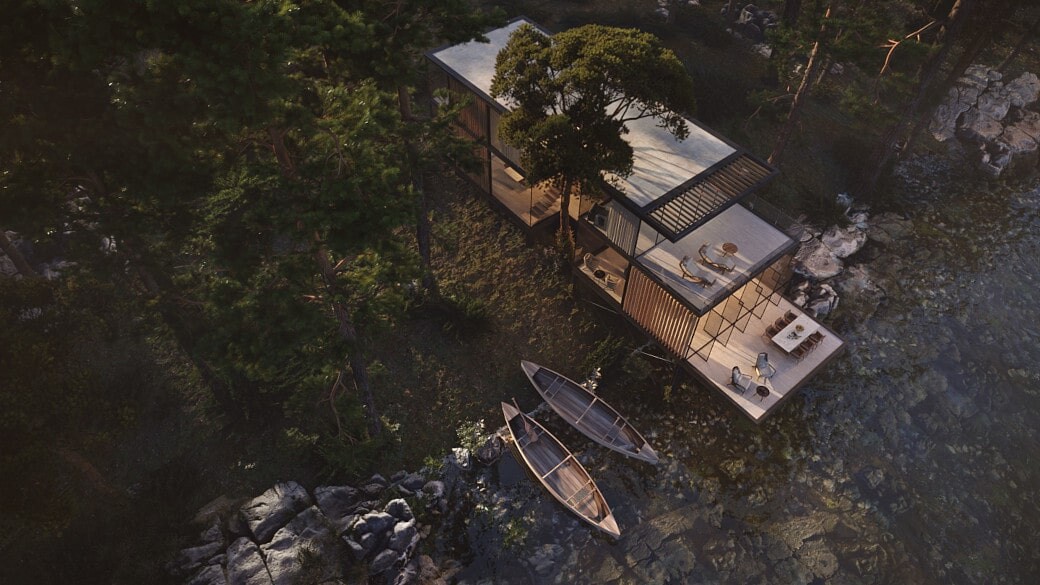
River House by Studio Aiko

The studio’s software package of choice is 3ds Max and Corona Render. 3ds Max is a staple of the CG industry and Corona render has slowly become one of the most preferred render engines for architectural projects and product rendering because of its mixture of biased and unbiased rendering tools and strong feature set. GarageFarm fully supports Corona for both their 3ds Max and Cinema 4D render farm.

‍“One of the main plug-ins we use in our pipeline is Corona Renderer by Chaos Group. We use it constantly and love its quality, ease of use, and constant development of it. Another plug-in we love is Tyflow by Tyson Ibele. It gives us an excellent solution for everything involved with particles and simulation. The constant development and frequent updates are impressive. We no longer need to use 3rd party software to achieve great results, which is a significant advantage in our working process.”

A Villa in Herzelia by Studio Aiko

Thanks for talking with us Meny! The work done by Studio Aiko, Meny, and Yair demonstrates the phenomenal potential today’s modern tools have when placed in the right hands. From hyper-realistic renders to their impressive client list, Studio Aiko has achieved a lot in their 17 years of business. If you’d like to try using the same tools that Studio Aiko uses to render their projects, visit our Corona render farm and get started with $50 of free render credits.

To learn more about Studio Aiko, visit studio-aiko.com or find them on Instagram @studioaikovfx.

---

Originally published at https://garagefarm.net.

How Kenneth Robin is using Cinema 4D for Experimental MoGraph

Article / 19 August 2022

Maxon’s Cinema 4D is used by motion graphics artists around the world to create engaging content that goes beyond typical 3D animation to merge the disciplines of art and design. C4D is a top choice for mograph artists because of its flexibility, customizability, and rapid development cycle. With each release, C4D has added more tools for artists to create engaging art with a purpose.

Today we're talking with one of those artists, Kenneth Robin, about their work in Cinema 4D and his most recent project for AT&T. Kenneth is a motion designer, 3D generalist, and typographer working out of Los Angeles, California on projects for some major clients like the BBC, BMW, and, of course, AT&T.

Kenneth started out his career in the arts as a print designer in the early 2000s in San Francisco's graffiti circles before transitioning into UI design and eventually 3D design.

I was in San Francisco designing Adidas basketball flash sites in 2006. Everything was done in Photoshop using 2D tools to make 3D-looking environments. I started learning about Cinema 4D in 2008 and found it to be a great design tool and a superior addition to my previous techniques. Soon after that, I dove headfirst into the motion design industry in Los Angeles and have been hopping around there since.

Because of his background, Kenneth's work is heavily influenced by typography, the world of graffiti, and what he calls 'Happy Accidents.'

Graffiti, the Search System blog, and Caravaggio are some of my main inspiration sources. Plus, I spent lots of hours trying to turn what I hear in music into images. Nature is a huge inspiration as well. I like things that look simple but have a lot of engineering going on under the hood. A lot of my work comes from happy accidents. So you could say Happy Accidents are also a theme in my work.

I will never show most of the work I've done, and that stuff is super commercial and non-abstract. As an artist, I never really wanted to be known for that kind of work, so I only share the strange experimental things I get to do on my time off. All that weird stuff actually led to more interesting projects.

Elevating process with Cinema 4D

As an artist, Kenneth uses Cinema 4D for most of his work. Cinema 4D is a top choice for artists like Kenneth because of its rich feature set and easy integrations. Specifically, render engine integrations for Redshift, Octane, Arnold, and Vray and app integrations such as the one for Adobe After Effects and GarageFarm's Renderbeamer application. Cinema 4D's almost seamless After Effects integration makes perfect sense for an artist like Kenneth, who needs the ability to work jointly with typography, 3D dynamics, and motion graphics.

AT&T Discovery District by Kenneth Robin

‍Cinema 4D is perfect for my type of workflow. It has a useful set of tools that allow a lot of flexibility within its own limitations. The features allow for easy iterations and fast ideation. Each version continues to improve upon itself, and it stays relevant and competitive in the 3D software market. There are some exciting developments in Cinema 4D R25 like scene nodes, volume modeling, and the integration of the Renderbeamer that I'm very excited about.

Better with every release new tools in Cinema 4D R25

Cinema 4D R25 has added tons of new features for artists. On top of a new modern user interface, R25 adds new modeling tools and controls, a new preset system, and deeper data integration tools.

Scene nodes can now be used to control splines, mesh geometry, and privatives for an even more advanced node-based pipeline. Also new are several OpenVDB volume modeling tools. These tools allow artists to build procedural models that aren't limited by traditional mesh modeling methods and retopologize existing models and sculptures into optimized mesh models. Volumes also work with fields to create procedural models or modify existing objects.

AT&T Discovery District by Kenneth Robin

Beyond the ever-growing feature set with every C4D release, users like Kenneth can also incorporate various C4D plugins and resources to build design projects. Including Xparticles, Turbulence FD, and assets from both Poliigon and Turbosquid. In short, Kenneth is a power user.

In addition to 3D dynamics and motion graphics, typography is present throughout Kenneth's work. The integration of typographic elements simultaneously elevates and grounds his abstract work. Because of this, he is also a pro at Adobe Illustrator.

Typography is one of the cornerstones of graphic design. A lot of the abstract 3D stuff gets too far away from the fundamentals and enters into a different realm. I like to anchor the abstractions in something everyone can relate to. It's also an unexpected angle to come from. I'm probably more attached to typography because of my beginnings as a print designer and my tinkering with graffiti lettering.

A brand experience at AT&T's Discovery District

Kenneth's latest project was creating an animated brand moment piece for AT&T's Discovery District Media Wall in Dallas, TX. He was tasked with creating a 6k, 60fps, 3600 frame shot with flawless render quality to match the media wall's impressive resolution.

It's a massive 6k resolution video wall that plays content around the clock. The screens have such amazing resolution that you can see every single detail in the render from a far distance, so it was very important that everything was done to the highest quality.

Kenneth rendered the entire animation on our Cinema 4D render farm after initially experimenting with creating a home farm.

The scene is a single-camera continuous shot, 6k, 60fps, 3600 frames, and uses a few terabytes of alembics to pull in the geometry. It needed some scripting to render across several machines. I originally built a home farm to render an older version of the piece, but it wasn't really enough to get the job done. The team at GarageFarm was able to properly set up this extremely heavy and complex render. The RenderBeamer integration for Cinema 4D was instrumental in the success of uploading the data and downloading the final sequence. I can't thank the team enough!

As a one-man studio producing top-notch media, Kenneth said it's important that he still uses the tools and resources that a larger studio would have, including renderfarms.

I have built smaller farms in the past, but there are limitations in terms of scaling and budgets. Technology is always upgrading, so I'm unable to keep up. Render Farms are a great way to speed up a large-scale export. Something that my farm would take a month to do takes a commercial farm just a few days or less.

The future as told by Kenneth

When we asked Kenneth about what he sees in the future of the design world, he told us that he expects to see a greater shift towards interdisciplinary design focused on integrating the real world with abstract concepts.

It is already happening, but more and more, we will likely see a continued blurring of reality in clever ways blended with smart design.

Motion Graphics, like the ones Kenneth creates in Cinema 4D, are some of the best "reality blurring" art forms in the design world today. While VR and AR take the spotlight, Kenneth's work proves that it's important not to forget about the origins of today's art and design trends. MoGraph is known for being a practical, grounded, yet energetic discipline and the 3D tools that artists can now use in C4D and After Effects take that energy to the next level.

For the future, Kenneth is looking to continue working on projects and venture into the world of NFTs.

‍I want to continue to freelance and lead medium-sized teams on motion and design projects when it's appropriate.

I'd also like to start making some passive income from NFTs. I haven’t really started minting art seriously which I know is a total miss! I have the velvet shackles of the motion design industry locked around me and I’ve been trying to get free but they feel so good. A lot of my peers have encouraged me to make the leap and make a collection. I hope this is something that will happen this year.

AT&T Discovery District by Kenneth Robin

---

Thanks for talking with us Kenneth! If you’d like to follow Kenneth’s work, you can check him out on his website kennethrobin.la or on Instagram @thekisblack. Kenneth’s work demonstrates what can be done in the world of experimental art with a toolset centered around Cinema 4D and aided by app integrations like Adobe After Effects and Redshift. The interdisciplinary tools needed to create experimental art pieces is often hard to come by, but Cinema 4D has clearly grown to be one of the best for integrating different art styles and methods.

---

Originally published at https://garagefarm.net.


Maya Updates for release 2023

Article / 15 August 2022

Autodesk Maya 2023 was released last March, and the Maya 2023.1 hotfix came out slightly over a month ago. Some feature demands were met, and other interesting new additions are pleasant surprises. In this article, we’ll go over what this Maya software update brings to the table. Maya’s latest release focuses on usability and quality of life improvements, making it easier for long-time users and even easier for those starting with the software. 

Before we get into it, we’d also like to announce that we have since updated our support on our Maya render farm to include the current release as well as some notable improvements in our support of UDIMS, OCIO CTFS configs, Substance assets (.sbar), Redshift files, Scene Assembly assets and more! Our file transfer application integrates seamlessly with Maya and allows users to upload their projects directly to our farm from within Maya’s shelf. We continuously keep our software up to date to ensure that all assets and dependencies in a project are detected and preserved when the file reaches our servers. Hence, nothing is amiss in the rendered output. We offer a starting render credit bonus of 50 USD to new users, and our live support team is available 24/7 to answer any questions or inquiries about cloud rendering on our render farm. 

With that out of the way, here are some of the exciting software updates for Maya 2023 and what was improved in 2023.1.


USD for Maya 0.18.0 (2023.1)

Source: https://blogs.nvidia.com/blog/2020/10/05/usd-ecosystem-omniverse/

Pixar’s Universal Scene Description format has allowed VFX studios to collaborate even when using different DCCs. One of its main features is USD layering, which allows artists to work on one scene without destructively affecting changes made by their peers. This version addresses major bugs reported from the previous release, such as long export times, camera drawing issues on the viewport, installation issues for Material X libraries, Skinning issues after Import and Export, support for ambient lights and more. 


Boolean improvements

Source: https://help.autodesk.com/view/MAYAUL/2023/ENU/?guid=GUID-CB48E50C-0E02-4791-9E1C-DFF8B2E7758B

Booleans are now much more procedural and easier to execute. Selecting objects and calling the Mesh>Boolean operation now creates a Boolean Stack panel that allows for auditioning different boolean operations non-destructively with real-time previewing. Thanks to this update, it is now possible to change boolean operations, display modes and the number of objects participating in the operation with a few clicks. The stack presents each object as its own layer, which can be disabled from the stack or rearranged to achieve different results. 

Source: https://help.autodesk.com/view/MAYAUL/2023/ENU/?guid=GUID-36D81368-C125-4574-A6CD-790081BF77B7

In the 2023.1 update, additional features were added including the ability to duplicate Boolean objects in the stack and setting personalized display modes as default when adding new objects to the stack.


Better retopology tools

Source: https://help.autodesk.com/view/MAYAUL/2023/ENU/?guid=GUID-DAE325AF-6D36-418D-8F97-1F0A5FF13C2C

A Preprocess Mesh option has been added to Maya’s retopology tools in this software update which makes retopologizing dense meshes much faster and more stable. This feature bypasses remeshing as triangles which was previously required before converting topology to uniform quads.. The Retopology tool has also been updated with open source algorithms for preprocessing and preserving data. 


Deformers updates

Several new deformers and falloffs  have been added in this release:

Transfer animation from one mesh to another using the Morph Deformer. 

Source: https://help.autodesk.com/view/MAYAUL/2023/ENU/?guid=GUID-EAA2B30E-DB3E-450C-91D9-82538439953F

Provided both meshes have the same topology, animation can be retargeted from one to the other via the Retarget setting in the Morph Options window. A Neighbor Exponent Setting in the Attribute Editor Morph Tab allows for correcting any unwanted results on the recipient mesh (artifacts may occur when there is a dramatic difference in the scale of the objects.

‍Morph Deformer Mirror Geometry

The Morph Options window now has a Mirror mode which makes it easier to symmetrize deformations such as facial expressions, poses and the like.

‍Solidify Scaling

It is now possible to scale up or down tagged geometry in the Solidify Attribute Editor. This makes adjusting specific details on a model less tedious and a little more procedural.

‍Proximity Falloff

This new falloff type allows the use of another mesh to act as a falloff influence for the active object depending on the distance between the two meshes. 


General modeling performance update

Maya 2023 is reported to be 30 times faster when evaluating component changes on high polygon meshes. Edit history is also faster with the introduction of node caching, which makes it so that Maya does not calculate each event in the history. Navigation, selection and modelling operations are now significantly less hampered by poly count.It is also now possible to adjust a mesh’s wire frame opacity which can be distracting when working with dense meshes. 


Improvements to Component Tags

Component Tags now provide more tag membership options. In the Component Tag Table, it is now possible to select any number of tags and assign a function that will be applied to the entire selection. Tags of one component type can now be converted to another component type (i.e. Edges to Faces, etc) via a new Convert Option in the right-click dropdown. Special characters like colons and periods no longer cause problems when importing FBX. A new Tag can be created from a selection of tags using the new Merge option. Tags can now be duplicated as well.  


Human IK Template (2023.1)

Source: https://help.autodesk.com/view/MAYAUL/2023/ENU/?guid=GUID-12C04C6E-DAEB-4F09-9DBB-418BF0117BF5

A new configuration has been added to the Human IK Character Templates. The FullRigControlsConfig provides a more elaborate list of hand, head, neck, spine and shoulder joints along with more bones for fingers and toes, allowing for a more comprehensive rig and controls for finer character movement and refinement of deformation.

FBX export options

Additional parameters for FBX data on export have been exposed. When sharing fbx assets with other Maya users, it is now possible to include History, Channels, Constraints and Expressions, which were previously only accessible via commands. 

And that’s our rundown of what’s new and improved in Maya 2023-2023.1. Be sure to check the official release notes for a more complete and elaborate view of the new features and changes. Thanks for reading, and as always, happy rendering from all of us at Garagefarm.NET.

Images used in the article were found on the Autodesk Help resources page for Maya https://help.autodesk.com/view/MAYAUL/2023/ENU/.

----

Originally published at https://garagefarm.net.

How IDENCE Co. uses physical design to fuel digital experiences

Article / 08 August 2022

IDENCE Co. is a video and computer graphic studio based out of Tokyo that has worked on some incredible multi-faceted productions. In this article, we hear from Riku Kato about the origins of IDENCE and how they've managed to build a team of highly specialized yet cohesive creators that develop industry-leading advertisements and video projects. We’ve had the pleasure of having Riku over at our Cinema 4D render farm, where he rendered the frames for the final sequence of his project.

Riku is a 3D/CG creator working with IDENCE to contract work for video and commercial production. Riku's love for Minecraft, like many of us, opened the door for his career in computer graphics at a young age as he began to grow in notoriety through his designs created in Minecraft.

"Although I mainly work in CG, my work has its roots in the Lego blocks I got when I was young. I have been creating things since I was very small, but when I was 12, I encountered the digital version of blocks, the game Minecraft. I loved to spend a lot of time building big buildings and kept building things well into high school. My work 'Gunkanjima, The World Heritage' attracted a lot of attention in the Minecraft community. At that time, it was featured on many TV programs and some official Minecraft events."

From there, Riku told us that his passion for 3D continued as he began to be exposed to the larger world of 3D computer graphics after moving from Kagoshima, Japan, to Keio University in Tokyo. This also laid the groundwork for the beginnings of IDENCE Co.

"At University, I was able to meet many people and work on creating projects together. One friend recommended 3D design to me. I was immediately fascinated by the high degree of freedom computer graphics gave me. And how 3D allowed me to control space as I liked while bringing in the behavior of light from the real world into the digital space. And when the current CEO of our company was in University, he set up a creative activity club and gathered people who had a passion for computer graphics."

Beginnings

IDENCE Co., Ltd. was launched by Riku with a group of friends he met at Keio University and soon turned into a full-service production studio. The small team of creators with their various specialties gathered in a small Tokyo office and began exchanging ideas and ways to produce high-quality work.

"Our team's strength is that our members together have all the specialized skills necessary for production such as shooting, 3D/CG, animation, music, sound effects, illustration, planning, fashion, and design. With all of these skills under one roof, we can do everything from planning to final production in-house."

TV Setouchi Broadcasting Co., Ltd. TV News “Nanaspa” - Opening https://idence.jp/works/nanaspa

Riku also told us that IDENCE was able to thrive by working directly with their clients. Most video production in Japan is managed through large advertising agencies that are great at handling large-scale projects but consume lots of resources on the production side. IDENCE works directly with their clients, enabling them to do high-quality work with a good budget without being totally consumed mentally and physically.

Inspiration from the physical world

Using the real world as inspiration is often the best approach to creating believable and inspired works, and IDENCE makes a practice of doing just that.

"Since I was little, I often would make mechanisms using gears with Lego blocks, so creating gimmicks is one of my biggest interests. I like to devise new products and devices, like the globe hand clock I made in 2021, one of my best masterpieces. As a creator, I strive to not only work through computer screens but to also actually create physical things to raise my level of understanding to create better models and more persuasive works."

Riku also mentioned that the team practices doing daily research to stay one step ahead of industry methods and designs. Despite their studio's small size, they meet for a weekly day of discussion to discuss how to use new techniques, systematize their existing methods, and exchange ideas amongst their interdisciplinary team.

Bringing a mystery to life

It's clear from IDENCE’s portfolio that they work on a wide range of projects. A recent project they worked on involved creating a set of six animations as a cohesive visual experience for a Murder Mystery party game. The goal was to create the first Japanese Murder Mystery game that uses projected images to direct visitors as they solve the mystery.

Joldeeno. Murder Mystery. https://idence.jp/works/joldeeno_murdermystery

‍“The tool we used is Cinema 4D. This project may impact the industry; it was required to proceed speedily. We were in charge of space design, construction, and video production all at once, but the most distinctive feature of this project was that six independent projectors projected this screen. Since the screen layout is three-dimensional, We made an image that makes use of it. For example, a brick wall is placed facing the screen, so it feels like there is a wall in the position of the screen. In the following scenes, adjust the camera placement to make the visitors feel a deep and spacious space. As a result, we created the feeling that went from a narrow place to a wide place, which is difficult with a two-dimensional image.

To attract new customers, we especially focused on the opening video. I made a full CG image for one and a half minutes, but since it is projected on six projectors, it is necessary to render each of the six, which is a calculation that costs six times the normal rendering cost.”

Joldeeno. Murder Mystery. https://idence.jp/works/joldeeno_murdermystery

Due to the large rendering needs for the project, the team opted to use a render farm to render the final videos. Riku told us a bit about his experience using GarageFarm to render the final animations.

"It was my first time using GarageFarm, but I was surprised at how easy it was to set up, and the rendering speed was far beyond our imaginations. We used the rendering service right before the final delivery of our project to our client. It was a few days before delivery, and I wanted to improve the quality of the render one step further, but it seemed obvious we didn't have enough time to improve on what we'd rendered locally on our studio PC.

I was a bit worried because It was my first time using GarageFarm, and we didn't have a lot of time if something went wrong. But I was surprised at how easy it was to install. It was supposed to be a complicated preparation, but the operation was completed on the web only by installing the plug-in.

Also, the support was very good. Our chat messages were promptly responded to, and we were able to deliver the project within a safe deadline. I realized after using the service that I can relax some and focus on the project before rendering without too much worry when I have support from GarageFarm."

Plans for the future

When we asked Riku about IDENCE’s plans for the future, he told us that they are interested in continuing to pursue a unique presence as a studio by incorporating technology and artistic expression. On top of that, they'd like to continue to offer useful services that utilize their team's broader abilities and interests, not limiting themselves to only video or design work.

"We would like to continue to pursue technology and expression so that we can propose the most suitable expression method to our customers without any restrictions due to technology. We're also aiming to realize a work style that is not bound by industry customs so that our creators can continue to devote themselves to creation with pleasure.

In the CG industry, I am also excited about the developments in the CG methods, tools, and expressions that are being made through the Metaverse's unique spatial composition and body theory.”

Thanks for taking the time to talk with us Riku! If you'd like to learn more about IDENCE, you can reach them on Twitter at @land_ineraf37 or visit their website at https://idence.jp

---

Originally published at https://garagefarm.net.

Breezetree, K-pop, and the push for new media in S. Korea

Article / 05 August 2022

The K-pop genre of music is known for its unique, hip-pop-inspired style that has drawn fans worldwide into Korea's art and culture scene. In the past decade alone, the K-pop industry has quickly become a world phenomenon, with artists like BTS completing world tours and gaining international fame. 

A 2019 Global Music Report showed that K-pop is among the top six music markets worldwide. The industry's rapid growth brings many challenges, not least the growing demand for high-quality innovative visual content and music videos to accompany artists' work. And CG is no small part of this. In K-pop, it's hard to find a music video or concert performance that doesn't feature 3D visuals.

In the past, we featured a VFX firm Plastic Beach in an article about the growing world of K-POP, but our interest hasn't fizzled out. So today, we're hearing from the studio Breezetree about the challenges of working within the Korean music industry and the need for online render tools like GarageFarm that can keep pace with the growing needs of the industry. If, like Breezetree, your team is looking for an online rendering solution, check out our render farm for free $25 render credits.

The brains behind Breezetree

Ji Woon Kim, the founder of Breezetree, graduated from college with an engineering degree but had a strong passion for the 3D arts which led him to pursue a job in CG. 

‍"I majored and graduated in engineering and went on to major in 3D animation in graduate school. I started working on music videos by chance, which has continued until now. I started as a freelancer from the beginning, and I didn't have any seniors or juniors in the industry, so I struggled a lot at first, and I still wonder sometimes if I'm doing things right or not."

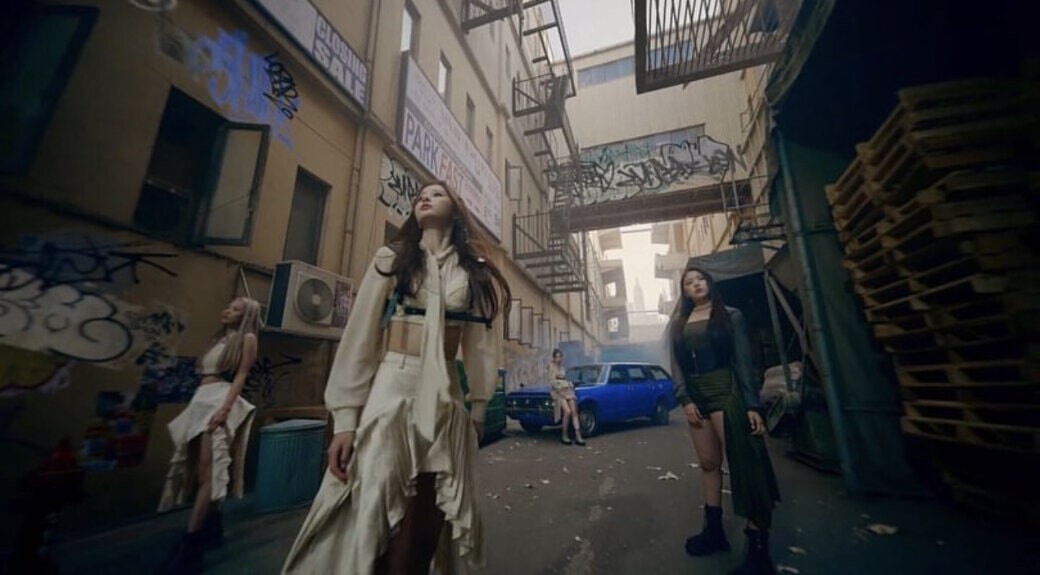
“O.O” NMIXX M/V

He started working in the visual effects industry in 2012 and soon after started Breezetree, a one-man-band VFX Studio with a focus on producing music videos for the Korean music industry. Ji Woon explained to us that the worldwide growth of K-pop in recent years has had a major effect on how media productions are produced. What was once a small, niche industry is now coping with holding the attention of millions of fans.

‍"About ten years ago, 3D was only used in limited ways in some music videos because the budgets for producing [K-pop] music videos was much lower than that of other media content. Most people had little experience with how far 3D could be utilized. Now, K-pop has become popular internationally, and the budget for music videos has risen so that we can try a variety of techniques. So now 3D has become an essential part of music videos."

The start of a worldwide phenomenon

K-pop made its first appearance in the 1990s as a niche genre for Korean teenagers, but in the past twenty years, the industry has grown alongside the internet and the increasing demand for new music styles. K-pop "idols" like BTS, Blackpink, and Psy (who produced the first YouTube video to pass one billion hits) have pushed the genre forward to breach the limits of being merely a Korean interest. Now, K-pop can be heard on radio stations and smartphones across East Asia, Europe, and the US.

“O.O” NMIXX M/V

"Worldwide" was an unfamiliar concept for K-pop 10 years ago, but now K-pop idols want to show their global perspective. 3D and CG, which have become the only way to represent fantasy in live-action music videos, have become an essential element."

Breezetree also told us about how the Coronavirus Pandemic pushed the industry, and his studio, even further into growth. A decrease in live preferences led to increased demand for new content.

“O.O” NMIXX M/V

‍"Due to the Corona crisis, singers' performance activities decreased, and as a result, many albums were released, which shortened the music video production cycle. Thanks to that, we have a lot of work."

Suffice to say, K-pop is booming.

Renderfarms & NMIXX

So how do render farms factor into the growth of K-pop? Well, the more music video studios like Breezetree develop, the more render resources the industry needs. A render farm allows artists to offload the heavy processing tasks of rendering off to a cloud-based server that can scale to a project's needs. In an industry where supply chain issues for equipment are increasingly unpredictable, renderfarms can provide some serious advantages.

Breezetree has been using GarageFarm's services since 2016 to render visual effects for the music videos they help produce. Breezetree says that, on average, the studio produces 30 music videos yearly. Their most recent project was for the South Korean idol girl group NMIXX of JYP Entertainment, the music video "OO" M/V.


‍"It was the first album for a big agency idol group, so a lot of money was spent on it, and the CG took the most amount of work in all the videos I've ever worked on over the past decade."

‍"I worked on a total of 200 cuts, but it's about 60 frames per cut on average, and there are as many as 5 or 6 layers per frame, so it's hard to calculate accurately. It wouldn't have been possible to produce it without using GarageFarm."

Projects like the one for NMIXX are a big task even for larger studios, but the one-person studio Breezetree can produce quality content quickly without wasting time on maintaining render infrastructure. Furthermore, online render farms allow artists to use next-generation rendering tools without spending the money to upgrade their own systems to render large projects.

“O.O” NMIXX M/V

Breezetree  uses the 3ds Max and V-Ray for most of his work and brings in tools like Houdini, a procedural effects tool when he needs them. For NMIXX’s music video, Breezetree had a tight deadline to complete all 200 shots. To give context, a typical project timeline for a music video is just 1-2 months from concept to final release.

‍“The greatest difficulty was that the production deadline was too short. The scene needs to be done with a terrible schedule, finishing nearly 200 cuts within 50 days, so it was physically and mentally very difficult. But I'm so glad the results came out well, as I worked hard on it.”


The music video is for NMIXX’s debut album and was directed by Sung Won-Mo of Digipedi, making it an important production for the client.

‍“Since it was NMIXX's debut album, pre-production was long compared to other projects.  For each part, we made a thorough storyline to determine what kind of CG we would need to implement according to the movement of the artist. Then we filmed it as it is and worked on the CG. However, depending on the scene, it was often impossible to proceed according to the script. In that case, we discussed with the director and discussed what angles and movement went well with CG.”

Breezetree x GarageFarm.NET

Breezetree’s team first heard about GarageFarm from a collaborator on a project and slowly began implementing the render service in the studio’s work from there.

‍“I heard that there was a relatively reasonably priced renderfarm (GarageFarm) and with the introduction of the director in charge of the project at the time, we used it for the project. It's affordable, I like the 24-hour support, friendly staff, and how easy it is to use.”

“O.O” NMIXX M/V

“Due to the short production schedules of music videos, rendering time was always a big problem, but after using GarageFarm, I didn't worry about rendering time at all. I'm recommending [GarageFarm] a lot, but I also have a small desire to keep it to myself [Laughs].”

Breezetree also explained that the 24-hour support offered by GarageFarm allows them to work at all hours without worrying about waiting to render or receive support during business hours.

“O.O” NMIXX M/V

‍“Due to the nature of my work, I often work at night, and it was nice to be able to get support service even if there was a problem during the night or if I wanted to purchase credits late. There was one time when I had a problem with the server not working correctly and I was able to find out more about the situation through the 24-hour customer service.”

The future of K-pop & Breezetree

Breezetree expects the demand for CG-heavy music videos to only increase as CG elements have become a staple of Korean pop music. The trend toward digital media across the world is opening up new opportunities for artists to expand into developing social media content and content for the metaverse. The team explained to us that, in their view, the future of the metaverse is largely dependent on how the public receives the new medium.

‍“Honestly, we’re still skeptical about the metaverse, so I don't know how much this will affect our industry. But many Korean entertainment companies are trying to do something that incorporates the metaverse, but we don't think it's very convincing to the public yet.”

“O.O” NMIXX M/V

In regards to technologies, Unreal Engine is slowly starting to emerge as a new tool for studios like Breezetree to create not only music videos but metaverse content. Interactive tools are becoming increasingly popular for their ability to rapidly prototype new projects in real-time.

Breezetree is currently working on the debut music trailer for a rookie K-pop idol. The studio is still just a one-person studio, but Breezetree brings in additional artists as needed. This year, they’re hoping to expand the studio to hire one or two additional full-time artists to help.

Conclusion

With what seems to be an ever-growing demand for K-pop and its larger-than-life allure, the demand for CG and consequently renderfarms, in the industry is only growing stronger. GarageFarm looks forward to supporting the industry by providing top-of-the-line rendering tools and support for studios like Breezetree.

To see more of Breezetree's work, follow them on Instagram @breezetree_june.

---

Originally published at https://garagefarm.net.

Why prerendering is here to stay in game dev

Article / 02 August 2022

With the next-generation advances of in-game engine technology in the past decade, a wide range of real-time solutions has replaced many of the needs for baked and prerendered content. Does this mean there is no longer a place for prerendering in-game development? In short, the answer in most cases is no. In this article, we'll be digging into how and why prerendered game visuals are used and why they aren't likely to leave games anytime in the near future.


A short history of prerendering

Prerendered content is any content that has been rendered before a game's public release. This includes any in-game image or video sprites, video cutscenes and cinematics, or static elements of a game environment such as backgrounds or distant details that have been baked to 2D image maps.

Prerendered content has been a part of game development almost since the very first video games hit the market in the 1970s and 80s. Prerendered cutscenes, simulations, sprites, and other "baked" content are how many games like The Last of Us or The Elder Scrolls were able to become the instant classics that they are.

Pac-Man Cutscene / Diego Moya

The 1980 release, Pac-Man, is well known for its snappy and humorous cutscenes that gave life to the 8-bit characters within the game. Cutscenes are the most common examples of how prerendered content is used in games. These days, it's hard to imagine game creation without thinking about cutscenes. Almost every major game release in the past twenty years has included some sort of cutscenes, be it prerendered, real-time, or a mixture of the two.

Other games utilize prerendered content for content that would otherwise be impossible to recreate in a game engine efficiently. A classic example is fire and water simulations, which often take too much computing power to render in real-time while maintaining good visual fidelity. Some games, like the Resident Evil series of the 1990s, relied heavily on prerendered content to generate full 2.5D environments and game levels.

Resident Evil / Capcom

So, why are cutscenes such a significant part of how games are created? The answer lies in the creative and technical challenges that game developers and designers must resolve. Cutscenes are often the best way to convey key plot points of narrative games and have the capacity to transform casual gameplay into a cinematic, purpose-driven game narrative. On the technical side, game developers have found that instead of leaving the user with a loathsome loading screen, cutscenes provide a perfect opportunity to hide the loading process off-screen while the user interacts with a cutscene.


Adding lightweight visual fidelity

Cutscenes or cinematics are the most obvious example of prerendered content in games. However, the way cutscenes are implemented is somewhat less obvious. With recent advances in real-time rendering, developers have a choice to prerender cutscenes, render them in real-time, or use a mixture of the two methods. The film-like cinematics of The Elder Scrolls would never be possible to render in real-time and are instead typically created in Maya or 3ds Max and rendered on a farm using a high-end ray traced renderer. 

On the other hand, cutscenes that try to match the visual fidelity of gameplay are often rendered within the game engine to save on game download sizes. The choice between these options is a tradeoff between visual fidelity and game size; with prerendered footage, even those on low-end consoles and computers can enjoy top-tier graphics, but with real-time cutscenes, the player's hardware will limit the visuals. 

The third option is to prerender the "real-time" graphics in-game on the high-end hardware and then display the footage as video cutscenes in the final game. This option is often used when game projects lack the funding to develop full-fledged externally produced cutscenes but still want to provide the best visuals possible to the player.

Assassin's Creed Valhalla / Ubisoft

Prerendered videos are not always used exclusively for cutscenes either. Short "event scenes” are often intermingled into gameplay to add to a level's story without interrupting gameplay for a long cutscene. This kind of content is often seen in games like Assassin's Creed or RPG games.

In addition to rendered footage, prerendered content often takes the form of in-game sprites. Sprites are images or image sequences that can be rendered in 2D or 3D games in place of full 3D meshes. The advantage of sprites is that they have minimal impact on game performance due to their 2D nature.

 For 2D games, often, the entire environment is built from sprites. But for 3D games, developers use sprites as either a level-of-detail option for distant objects or use them in areas where the player wouldn't notice their 2D nature. For example, a distant campfire asset can be rendered as a high-resolution smoke simulation in Maya before being converted to a 2D sprite sequence. Most game engines support sprites out of the box, and sprites can be found in almost any game if you look closely enough.

Isometric Dungeon Pack / Kenny Game Assets

Although sprites are 2D objects, in some cases, they can be used in sets to build more complex environment elements such as skyboxes. Skyboxes can be made out of 5-6 sprite tiles to generate a game level's basic sky or distant environment. Skyboxes can be either a single prerendered image set or a set of prerendered image sequences for animated backgrounds. Skyboxes are often prerendered using a ray tracing renderer like V-ray or Corona before being converted for use in a game engine. 


The player's perspective

The use of prerendered content in games has long been a fierce topic of discussion for players and game designers in the past few generations of game releases. On the one hand, some players prefer all game content to be as interactive as possible. For these kinds of players, cutscenes and cinematics take the player out of the story and force them to be merely on watchers of the story rather than plotting their own path.

The Last Of Us Remastered / Naughty Dog

But on the other hand, other players and game designers see cutscenes and other prerendered content as the key to the modern, story-driven gameplay experience. After all, it's hard to imagine playing a game like The Last of Us without the essential story elements that its cutscenes add. As much as interactive gameplay is valuable, story guidance outside of traditional gameplay is sometimes needed to covey a game's plot points.

Mirror’s Edge / DICE

Another aspect to consider is that cutscenes allow greater control of a game's art direction. Mirror's Edge, for example, chose to use a completely different 2D style for its cutscenes to contrast the realistically styled 3D gameplay environment. Games like the Final Fantasy VII Remake choose to go in the opposite direction, hiring artists to create incredibly realistic visuals and flyovers and truly add a whole new layer to the game's world-building. In fact, the quality of cutscenes that some games include has led many fans to create entire "cutscene movies" by splicing a game's cutscenes and story together.


Conclusion

In the end, the choice of how or when to include prerendered content in-game falls on the story and gameplay goals of a game's developers. Out of place, a poorly timed cinematic or erroneously placed sprite can leave users feeling discontent. But when integrated well, a cutscene can add invaluable context and visual mastery to a game. This is why entire teams are often devoted to building the prerendered content of a game using external tools and render farm services.

Prerendered game elements have a journeyed past of pushing the limits of game technology to make the most of limited resources. Be it a cinematic cutscene, a massive in-game simulation, or simply the moving clouds of a skybox, prerendering game assets provide unique advantages that few other methods can meet.

---

Originally published at https://garagefarm.net.

From industrial design to a full-time NFT artist using Blender 3D - interview with Victor Duarte

Article / 20 July 2022


Months after Beeple’s revolutionary NFT debut with Christie’s, we’ve seen a steady growth of interest among 3d artists and content creators. We’ve seen some studios transition almost entirely to NFT creation. The transition towards a more sustainable blockchain is underway, and new NFT platforms for aspiring artists are emerging. What started as an expensive craze that seemed to profit celebrities and people with clout is now a seemingly viable means for actual artists and studios to make a profit from their hard work.

Victor is one such artist, whom we have had the pleasure of conversing and collaborating with on multiple occasions, and has graciously sat down with us yet again to discuss the new digital frontier of NFT art.


Victor’s beginnings

Victor is a 3d artist from Barcelona, Spain. He started a career in mechanical engineering but was always fascinated with digital art. His passion for the craft eventually led him to begin taking freelance work focusing on 3d architectural visualisation and mockups of spaces for events.

Sometime before the public eye turned its gaze toward Crypto Art in general, he was contacted by MakersPlace and invited to mint some of his work with them to be sold as NFT art in what perhaps was the earlier incarnation of the phenomenon we’re seeing today.

MakersPlace is one of the earliest NFT platforms that has amassed a roster of serious digital artists from various backgrounds. They have grown exponentially since their launch in 2018 and have reached around $60,000 worth in transactions as of 2020. 

Like Victor, the artists selling on the platform produce quality work with a limited number of editions. MakersPlace charges 15% in commission for each sale, but rewards artists with a 5% royalty for every subsequent sale made with their purchased work. Collectors can buy art with Ethereum or traditional currency using well-trusted platforms like PayPal or Stripe. Perhaps one of the key characteristics of Makersplace that prove attractive to artists and collectors alike is the level of curation that goes into what works are sold on the site.

Victor recalls how there were no GAS fees in the beginning, and it was commonplace to mint hundreds of works at a time. He made 100 editions of one of his earlier works and has made 20 sales so far. 

NFT art today

These days, he says, are much more difficult because of the expensive GAS fees and the overwhelming competition. He compares the artist’s struggle in creating successful NFT art to gaining visibility on Instagram, where skill, marketing savvy, and a willingness to pander to trends are all legitimate factors for a chance at the limelight. 

Above that, there’s the sheer volume of digital artists to contend with, some of whom will inevitably outclass you. To Victor, selling your work as NFTs is precisely that, but with big money or at least, the prospect of a livelihood is at stake.

When asked what his advice to other artists is, he stresses the importance of being true to yourself and your work. He reasons that because it will have a place in the blockchain forever, your work should be something you’re proud of. It might seem a little naive, but there’s genuine wisdom in that, now more than ever.

The value of digital art is all too easily equated with engagement statistics. On the one hand, it’s a fair indicator of its effectiveness. On the other, it is also likely to be influenced by many factors that may not favour new or alternative themes or approaches. For artists looking to make art a full-time career, it would be all too easy to compromise their vision for the promise of better engagement, to a point where they may end up milling content instead.

Blind pandering will ultimately hurt the chances of making anything meaningful in a practical and actualising way. Perhaps when the haze of trying to get rich quick finally clears, it will be those like Victor that continued to make something of real meaning and value to them that will stand out from the rest. 


What Victor is up to these days

Victor is determined to carve a place for himself in the digital art world through NFTs and more traditional avenues. He continues to draw from his love for Science Fiction and the surreal, citing Isaac Asimov and Moebius as some of his sources of inspiration. His work reflects his meditations on the future of humanity and the questions we face today and may face as our technology and ambition continue to grow. 

He’s paused his usual freelancing work to focus on stories he would like to tell in the form of static images and loops. His Artstation account is full of fascinating glimpses of futuristic cities, mysterious forests and more symbolist work that focuses on the human form. He brings together these ideas in an ongoing series he calls Immemorial and plans to incorporate animations that will help to form a narrative or montage of his very own fictional universe.


According to Victor, the story of IMMEMORIAL takes place in an uncertain time and place where all consciousness is controlled by an Artificial Intelligence entity known only as "O.M.N.U.S". It is speculated that the migration of consciousness happened incrementally over a timespan - none can say how long because the AI had occluded all memory of humanity. For the most part, human beings are vessels driven by an artificial brain connected to a network and are simply referred to as "Bodies".

There are a few anomalies that have somehow preserved their natural consciousness. These humans would risk their lives to connect to memory servers to remember who they were as individuals and as a species. They fight to destroy O.M.N.U.S. and reclaim what's theirs to build a better future for all people.

Victor’s also found himself doing more writing than actual 3d production lately, and we’re excited to see the fruits of what he’s been cooking up.

Outro

We're happy to have been able to check in with Victor from time to time, and we have always been fans of his work and watching him grow as an artist. You can view our previous live stream sessions with him on YouTube.

We experienced some technical issues during the actual podcast, but if you'd like to listen to DJ's conversation with Victor, you may do so here.

To learn more about Victor, have a look at his website and works for sale!

About CG Talks

CG Talks is a Podcast from the creative team of Garagefarm.NET. It airs once a month on average and features conversations about exciting developments in the world of 3d computer graphics and digital art and interviews with artists and CG professionals.

---

This article was originally published on the GarageFarm.NET website.

Software square-off: Cinema 4D vs Blender

Article / 19 July 2022


Cinema 4D or Blender? Is one better than the other? Are these pointless questions?

Whether you’re a beginner about to start your journey in crafting 3D graphics or a professional with years of experience in either or both software, you’ve probably asked this question one way or another. If you’re a beginner, you’re most likely interested to know which one is easier to learn. If you’re a pro, you’re probably wondering whether you’re missing out by not using the other software. 

In this article, we will offer insights and judgments on which software is better in certain aspects. But of course in the end, “better” depends on your needs, your process, and your circumstance. Your mileage may vary.

The comparison will revolve around 5 themes: user interface, modeling, rendering, animation, and pricing. We’ll tackle pricing towards the end so that you first get an idea of the capabilities of each before non-3D concerns, i.e. money, factor into your decision. 

But before we launch into the head-to-head comparison, make no mistake: The whole Cinema 4D vs Blender contention boils down to preference. Both are fully-featured and robust 3D software that will deliver stunning, photorealistic (if that’s what you’re after), and simply amazing 3D visuals, provided of course that you devote the time to develop your skills.

If you are a Cinema 4D user, you can always use an assist from our industry-leading Cinema 4D render farm, especially when you are rendering projects on a tight deadline and a tight budget. Check out our pricing here.
Now, on with the software square-off!


User interface

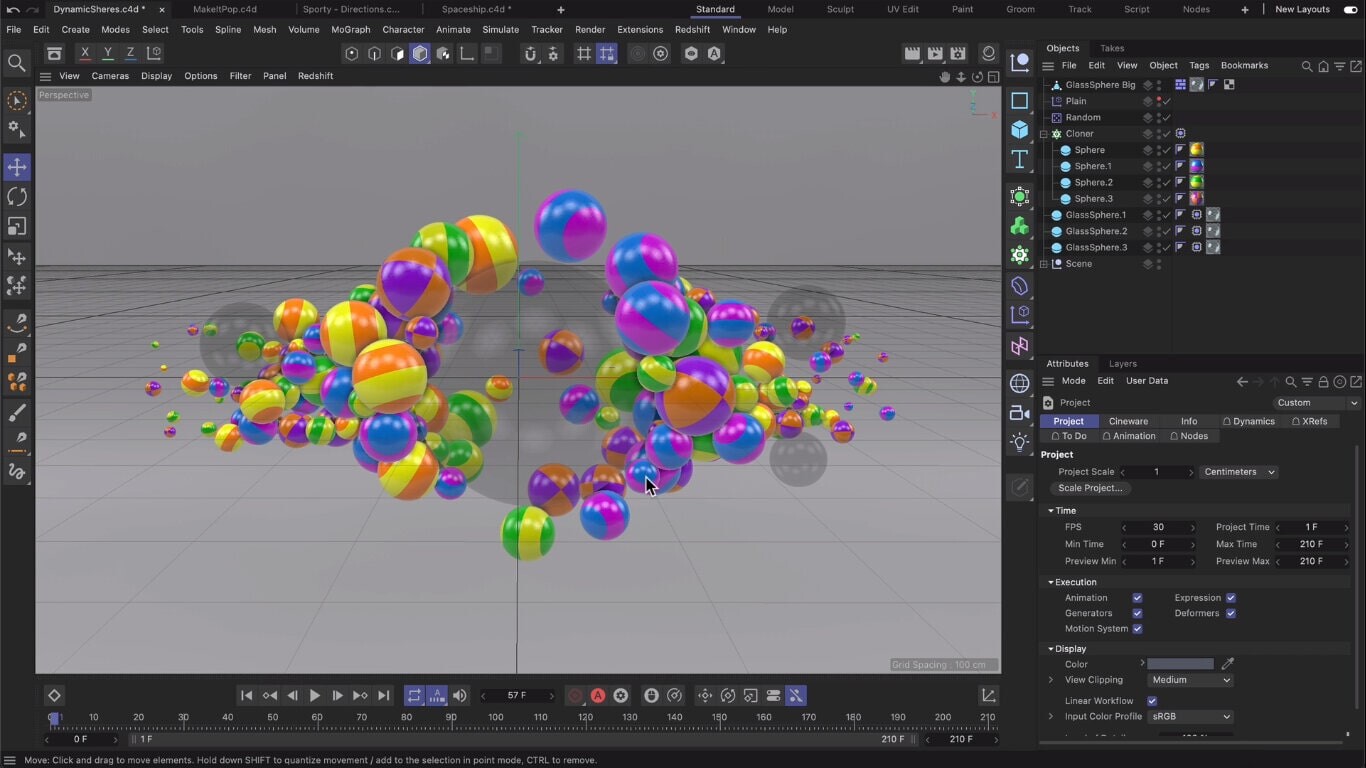
Cinema 4D has hands-down a more intuitive user interface than Blender. It won’t even be a stretch to say that Cinema 4D has the best user interface among all 3D software. This makes Cinema 4D the more beginner-friendly software as well. With how seamless Cinema 4D’s UI is designed, it takes only a couple of days of familiarizing oneself with the menus and tools before it all becomes second nature. 

In Cinema 4D, all object properties, brush settings, add-ons, and other features can be found in one area. Compare this with Blender, where different settings appear in separate panels that can be confusing and cause you to have a cluttered screen. 

Cinema 4D’s user interface.

Another jewel in Cinema 4D’s UI crown is its Object Manager, its system for managing all the objects in a scene. When you are dealing with production-level scenes that have thousands of objects within one scene, a great management system is absolutely critical. The Cinema 4D Object Manager makes life simpler with its tagging system, take system, drag-and-drop capabilities, and more.

Where Blender gets a leg up over Cinema 4D in terms of UI is in animation. In Blender, it’s easy to toggle between the keyframe timeline and the graph editor. Unlike in Cinema 4D, when you want to see all location keyframes at once, things can get cluttered.


Modeling

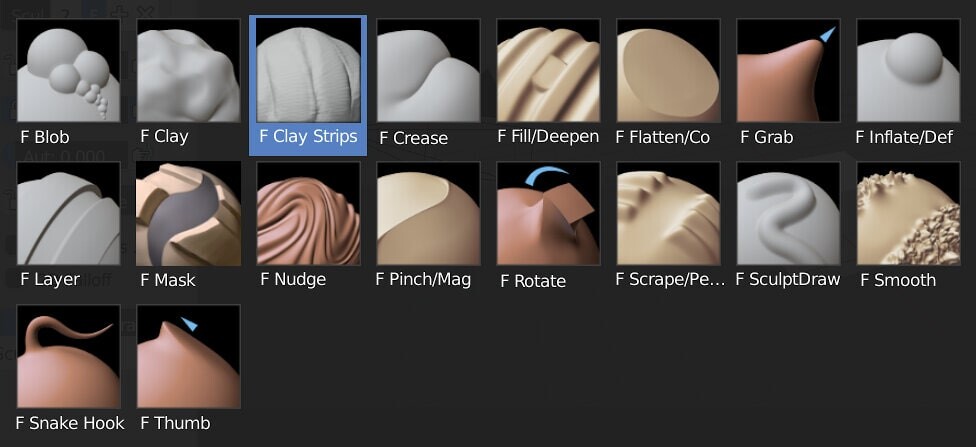
Both Cinema 4D and Blender 4D excel at polygon modeling. But when it comes to sculpting, Cinema 4D loses to Blender. Sculpting is a particular focus of Blender, with more sculpting brushes on hand plus it has sculpting updates seemingly every week. This makes Blender the better choice for character modeling as well. If the task involves modeling creatures or people, Blender’s sculpting tools are perfect for modeling your raging orc warrior or quirky office dad. Blender’s sculpting tools also lend themselves well to creating detailed buildings.

Sculpting tools in Blender. These tools make it easier to create complex organic shapes.

When it comes to populating a scene, Cinema 4D library of assets makes it easy to do just that. It has a vast collection of 3D objects, materials, and node capsules that you can use to help assemble your scenes quickly. From vases to trees to books to rocks, the Cinema 4D library probably has it.


Rendering

Cinema 4D vs Blender in terms of rendering? not even close: Cinema 4D, on top of its native Physical Renderer engine, also has built-in support for Redshift, V-Ray, Octane, and Arnold. Blender only has Eevee (a real-time render engine) and Cycles. Eevee is not used that much on professional-level output. And while Cycles does the job quite well, Cinema 4D’s Redshift, V-Ray, Octane, and Arnold are just simply on another level. 

Most film production-level VFX and world-class archviz houses render their stuff using one of those 4 top render engines. And so far Autodesk, the maker of Arnold, has no plans of releasing Arnold for Blender. It’s worth mentioning however that users from Blender’s robust community have created plugins that bridge Blender with top third-party rendering engines like Arnold.

Cinema 4D running the Arnold plug-in


Animation and VFX

Blender has an outstanding fluid, smoke, cloth, and fire simulations. You can get realistic fluid dynamics and smoke and fire effects using native Blender tools that trump those of Cinema 4D’s. 

Smoke and fire simulation by Blender.

However – and this is a biggie – Cinema 4D has built-in support for X-Particles, a premium (read: paid for) plugin that is simply the standard in particle dynamics effects. Once you plug X-Particles into Cinema 4D, frankly, you won’t look back. It can set you back anywhere from $107.25 (Learning Edition) to $1072.50 (complete edition) though. X-Particles is sold only as part of the Insydium Fused Collection that includes other plugins, add-ons, and libraries and cannot be purchased separately.

When it comes to 2D animation, Blender edges out Cinema 4D. Blender has what is called Grease Pencil, a unique tool that allows you to draw, composite, and animate 2D art inside 3D space. But why would you want to make 2D in 3D software, you ask? If you’ve ever heard of concept art and storyboarding, important processes that take place before any film production, then Grease Pencil is ideal for that. But hey, it’s not limited to that. You can create actual 2D movies using Blender with the help of Grease Pencil, which is exactly what Blender Studio did to showcase its 2D capabilities. Just see how cool this animated movie is. That’s all done in Blender.

This short film was done entirely in Blender to showcase its 2D capabilities.

For motion graphics, most artists would likely choose Cinema 4D over Blender. It has the MoGraph Toolset, an intuitive, comprehensive, and powerful palette of functionalities that will deliver on pretty much anything you can imagine when it comes to motion graphics--flying logos, transforming words, kinetic letters, abstract effects, and so much more. 

Pricing

At this point, you’ve probably noticed that we’ve said more good things about Cinema 4D vs Blender. But this is where we pull the rug from under your feet, so to speak: Blender is free. 

Remember in the opening paragraphs where we said that Blender and Cinema 4D are both fully-featured and robust 3D software that can deliver pretty much comparable 3D output? That is true, but Blender is absolutely free. It is open-source and receives continuous updates and has a huge bank of add-ons that are also free. You can download it right now (it’s only 147MB!) and start designing. So while Blender is a good (and improving) 3D software with lots of amazing features to boast of, its price or lack of one is perhaps its most attractive.

But while Cinema 4D’s monthly subscription starts at around $109, its price is actually among the more affordable premium 3D software out there. So considering that it’s perhaps the industry standard in some aspects of 3D production, Cinema 4D doesn’t completely lose out in this aspect versus Blender.

This whole article has focused on pitting C4D vs Blender. But of course, nothing is stopping you from using both. For example, you can do concept renders and storyboarding in Blender then port everything over to Cinema 4D for the final renders. Cinema 4D and Blender are both 3D powerhouses, each with unique strong points that open up different possibilities for any 3D artist. 


This article was published originally on the GarageFarm.NET blog. 

The Romanian renderer

Article / 17 May 2022

Architect-turned-archviz artist Lucian Racovitan--founder of  Bucharest Studio--talks to us about 3D and the beauty of figuring things out for yourself.

The Shenzhen Opera House proposal by Bjarke Ingles Group‍ https://www.lucianr.com/shenzhen-opera-bjarke-ingels-group2

No, that’s not a photo. That’s a 3D render by Lucian Racovitan, founder of Bucharest Studio, an architectural visualization firm based in Romania. Lucian’s works are often so mesmerizingly photorealistic that anyone viewing them would understandably assume that they are crafted by someone who has dedicated all his life, from teenhood to adulthood, to 3D excellence. 

But that is not the case. Lucian may be a 3D expert now (perhaps even a master) but he did not plan to be one. Lucian is an architect by training and he plied his architectural chops for at least a decade in different places across the globe (Japan, Abu Dhabi, Copenhagen) before he shifted to 3D visualization full-time. 

The story of how he got started with 3D was more comedy than legend: back when he was still working for an architectural firm, his colleagues assigned him to do 3D rendering tasks not because he had the skills (he had none) or experience (he also had none) or even a liking for it (he didn’t, at least not at first) but because he had the looks for it. “The guys in the office looked at me and thought maybe I looked cool with my cool glasses and my cool music and said ‘Hey, maybe he can do 3D,’” said Lucian. 

Reluctant though he may be in the beginning, Lucian grew to love creating 3D renders. “Rendering is a form of self-expression and it feels glorious,” said Lucian.

Needless to say, Lucian’s architectural background definitely helps him with his 3D projects. The architectural design has a huge effect on the render primarily because curves, lines, and materials greatly affect how light behaves. And when it comes to 3D rendering, light is everything. For example: if you have a straight glass window and there’s a tree in front of it, it will only reflect the tree. But if you have a curved glass window, it will reflect other objects in the environment and you have to deal with that. Now you have to model more details in the exterior. “Doing a complex render is worth it,” said Lucian. The cool office kid has come a long way.

The winning proposal for the Centre Monnaie/Muntcentrum Brussels Redesign by Snohetta & Binst, rendered by Bucharest Studio. https://www.lucianr.com/snohetta-binst-centre-monnaie-muntcentrum

For someone who produces stunningly beautiful 3D visuals, Lucian has a unique perspective when it comes to appreciating his works. For Lucian, just because a design is very complex structurally doesn’t necessarily mean that its 3D render is superior. For him, every render has its own needs and as an artist, you service that need. A render of a normal car park can appeal to Lucian as much as his render of a proposal for the Shenzhen Opera House does because he understands and appreciates the technicalities, the decisions, and the process that went into even a relatively simpler render like a car park. 

For Lucian, regardless of the brief, you can always find something you can like about a project, even if you don’t necessarily like it aesthetically. “We don’t like all projects equally, but we love the renderings that we do for it. Not all projects are aesthetically pleasing but you can find an aspect of the project that you can like. Like, it may be good for the community,” said Lucian.

Speaking of aesthetics, it’s surprising what Lucian finds to be the key in creating outstanding 3D renders. It’s not meticulous models, or fancy textures, or advanced lighting algorithms. For Lucian, the key to a realistic, natural-looking 3D render is white balance. 

“It can make or break an image. Someone can whip up a simple render in 15 minutes but because they know how to control the white balance, they can make it look quite realistic and beautiful. White balance is in the camera, it’s easy to set. It may be overlooked but it’s very important,” said Lucian. He may be an architect by training and an archviz artist by experience but Lucian definitely has the eyes of a photographer.

Express building London/ Bjarke Ingels Group. Render by Bucharest Studio. https://www.bucharest.studio/stills?itemId=db36urs5l6nt8393ewi0nypjtc9k7e

With such outstanding output for multiple clients, you’d think Lucian must have a special, proprietary way of optimizing scenes and processes in order for renders to be completed more efficiently. Again, Lucian surprises. Because he has never worked for an archviz firm before setting up his own, Lucian and his team has always had to figure things out on their own. “We don’t know if what we’re doing is right. It could be that everything that we’re doing is wrong. But because I can’t compare our process with anything else, I don’t know if any of our stuff is optimized,” said Lucian. 

In modeling, texturing, animation and other aspects of 3D design, yes, Lucian and his crew have always had to figure things out on their own. But when it comes to rendering, Lucian has always had help when rendering with our render farm and 24/7 support team. 

“GarageFarm is f*cking great. I don’t get anything from saying this but it is simply great. Especially the 24/7 support,” said Lucian. “24/7 support is the most beautiful thing on Earth. You don’t know how liberating it is and how comforting it is to know that we are able to talk to somebody when things get clusterf*cked. That’s unbeatable.”

Lucian appreciates not just the technical skills of GarageFarm’s 24/7 support team but also the way they genuinely connect with customers. Once, during a live chat over some rendering issue Lucian was resolving with the support team, the D2 Vienna Conference came up. “They mentioned that they’re going too and we’re going as well and they said let’s catch up over some beers there. It’s the nicest thing,” recalled Lucian.

Having a 24/7 support team of 3D experts is the key advantage that Lucian appreciates the most about rendering via a render farm. For him, it’s almost pointless to put up your own render farm. While you and your team may be able to buy all the hardware, the maintenance is just a whole other level of time, energy, and manpower investment. “It’s like deciding to be your own dentist. I don’t want to go to a dentist and fix my own teeth. It doesn’t work.”

If you’re interested in not being your own dentist and are looking to render a project with GarageFarm, you can get started with some free credits by signing up here.

Lucian and his team mostly use 3ds Max. View more of Lucian’s work here, and here.

...

This article was originally published on the GarageFarm.NET blog.

South Korean VFX firm Plastic Beach talks 3D rendering for K-POP

Article / 12 May 2022

BTS, NCT 127, ATEEZ, TWICE, Xdinary Heroes--these are some of the repeat topnotchers of the Billboard K-Pop 100. They are also some of Plastic Beach’s 3d clients.

Song Chan-young has come a long way from working as a freelancer in 2015. In such a relatively short time (he officially formed Plastic Beach as a company only in 2019), he and his team have accumulated pretty much all the who’s who of the South Korean pop music scene and created a whole array of music videos for them. As K-pop was taking over the world, Plastic Beach was taking over the K-pop vfx scene.

The music video for BTS’ worldwide mega-hit Butter wouldn’t be as smooth without Plastic Beach’s 3d magic

Chan-young did not exactly set out for world domination. When he and his co-founders met at an after-school club in South Korea, they were just there to study. It was during that time however that Chan-young and the team “accidentally” started working on music videos as a freelancer. How an accident like that could have happened Chan-young did not elaborate, but it’s definitely safe to say that had that accident not occurred, K-pop music videos would look very different today. Since then, he expanded the team to include 15 people that he met in that club. 

When it comes to K-pop, the artists and the songs may be the ones that first come to mind. But the visuals in the music videos do a lot of heavy lifting when it comes to making the whole package relatable, desirable, and exciting for a global audience. When BTS launched the music video for Butter, millions of people tuned in to the live video of its countdown. If the music video itself failed to amaze, those millions would have been gravely disappointed.

Worse, imagine if Chan-young and his team failed to complete the video in time. Take another example from Plastic Beach’s amazing body of work--Xdinary Heroes’ music video for Happy Death Day. On average, it took 3 to 6 hours to render a frame. Chan-young had to render more than 1000 frames for the project. If Chan-young didn’t have the help of our render farm to render these frames via the cloud, the project would probably still be rendering today.

A scene from the music video of Xdinary Heroes’ Happy Death Day. The band was shot live; everything else is 3d.

Especially for a lean-and-mean team like Plastic Beach, an online render farm is an absolute must-have in their workflow. A small team like theirs find it difficult and costly to put up their own rendering farm. It also takes a lot of time to maintain rendering machines, time that could otherwise be used for actual creative production. Tapping a GarageFarm made absolute sense for Chan-young and Plastic Beach, especially in the music video industry where deadlines are often shorter compared to other fields like, say, architectural visualization.

Time-efficiency and cost-efficiency aren’t the only reasons why Chan-young chooses to work with GarageFarm for Plastic Beach. Having a tech support team on hand 24/7 has proven to be a lifesaver multiple times. 

Back when they were working on the Dynamite music video for BTS, Chan-young and his team encountered a problem uploading a large-scale FX scene cache file. With Korea Telecom's daily network speed limit, it took a lot of time to transfer large files. But thanks to a solution found by the tech support team, Chan-young completed the project on time. GarageFarm’s tech team made sure that the files went through successfully as Chan-young’s team uploaded each file separately and manually.

“I think it's the biggest strength of GarageFarm,” said Chan-young, referring to the tech support team.

“While other render farms are slow to respond and only give typical answers, GarageFarm was good because there were many actual experts who actually solved the problem.”

While there’s always a K-pop music video on Plastic Beach’s plate, Chan-young and his partners are looking to break into the world of NFTs. They have piloted a website called TOCOTOUCAN, basically an auction site for the NFTs of digital artworks. It’s still early days for their platform, but Chan-young is very excited about it. “I think NFT can completely change the digital art industry,” said Chan-young. 

They are also looking at creating and publishing Profile Picture NFTs (PFP NFTs). PFP NFTs is a recent trend in online platforms where users’ actual profile pictures are connected to ownable NFTs. Some PFP NFTs, like the one of Adidas partner Gmoney, have become so popular that it has almost become an influencer in its own right. 

Chan-young’s goal is to connect the world of K-pop with the world of 3d and NFTs. “We are aiming to conduct various experiments in the field of visual assets that we are good at. Currently, we are preparing a new brand that connects the characters we created, NFT, and offline space,” said Chan-young. “NFT is currently the hottest issue, and ultimately we aim to create an ecosystem where all digital artists can grow and be self-sustained, not relying on others.”

If you want to know more about NFTs and how it relates to digital art, you can read our article about the history of NFTs.   

Chan-young also thinks volumetric capture technology will be a game changer. What the technology does basically is it captures the space itself and converts it into data as opposed to what normal cameras do, which is to capture footage of the space. Once the space itself is captured, most of the work will be done in post instead of holding a camera and shooting in that space. This technology will dramatically lessen the time used for actual video shooting and give filmmakers access to camera angles and movements that are simply impossible using real cameras, like shooting below ground level or seamlessly pulling out to a super bird’s eye view shot.

These may all sound kind of “out there” right now. But this is Chan-young we’re talking about, the man who went from freelancer to K-pop 3d overlord in just seven short years. Don’t be surprised if Chan-young turns all of these into reality faster than you can sing “side step right left to my beat.”

Chan-young and his team use 3ds Max and V-Ray, and they like plugins like ForestPack, Phoenix FD, and Tyflow.

If you are interested in rendering a project with GarageFarm or if you simply want to know more about our cloud solution for 3ds Max, check out our 3ds Max render farm.

...

This article was originally published on the GarageFarm.NET blog.